No. You cannot rely purely on Google Keyword Planner for Pinterest Keyword research. Whilst Google Keyword Planner can provide you with some incredibly useful metrics about users search intent, volume and demand, Pinterest is a very different search engine. It’s a visual search engine, meaning the query graph, user state and search algorithms will be different.
Relying purely on Keyword Planner will create a context issue, causing you to have wrong volume, content types and less distribution.
Google Keywords vs Pinterest Search Demand (Semantic Gap)
Google and Pinterest will interpret your queries differently using their own vector space.
By relying purely on Google Keyword Planner you will experience:
1. Differing Search Intents (Informational vs Actionable)
Google Search Intent: Will be very specific and targeted. Usually Informational or Transactional (i.e. “best lightweight vacuum under $200”)
Pinterest Search Intent: Will be more exploratory and visual. Usually Aesthetic related (Aesthetic apartment cleaning routines) or “minimalist home organization aesthetics”.
Queries with a high volume (50k+/month) on Google may have 0 volume on Pinterest if they’re not visual.
Queries with a high level aesthetic will often have a massive volume on Pinterest with low bids on Google Keyword Planner.
2. Search Volume Differences
The Google Keyword Planner tool will only provide you with volume information from Google’s index.
| Keyword | Google Volume (GKP) | Pinterest Demand Vector | Strategic Alignment |
| how to organize kitchen drawers | High (Transactional/DIY) | Highly Visual | Both |
| best Python backend frameworks | High (Textual/Code) | Low (Non-Visual) | Google Only |
| boho living room moodboard | Low / Long Tail | Very High (Visual) | Pinterest Only |
3. Text Based Search vs Visual Search
Google will rank content based on text relevance, link graph and entity relationships.
Pinterest will rank based on:
- Text Entities: Pin Title, Board Title, Description, Alt Tags.
- Visual Entities: Computer Vision – Analyse Image, Object Recognition, Aesthetic Similarities.
- Engagement: Saves, Close Ups & CTR.
If your visual entity doesn’t match the visual entities Pinterest have indexed then your pin won’t rank due to only using text keywords.
How To Correctly Validate Keywords For Pinterest?
Only use the Google Keyword Planner for initial queries.
To ensure your content will rank in Pinterest you must validate your seed terms using native signals.
1.) Extract Seed Entities From Google Keyword Planner OR Pintrendo Keyword Tool
Use the Google Keyword Planner to find broad semantic entities.
Seed Term Example: Meal Prep
The other recommended way to get things done is to use Pintrendo Pinterest Keyword Tool, here’s how to do it:
1. Enter your seed keyword in Pintrendo and click find keywords:
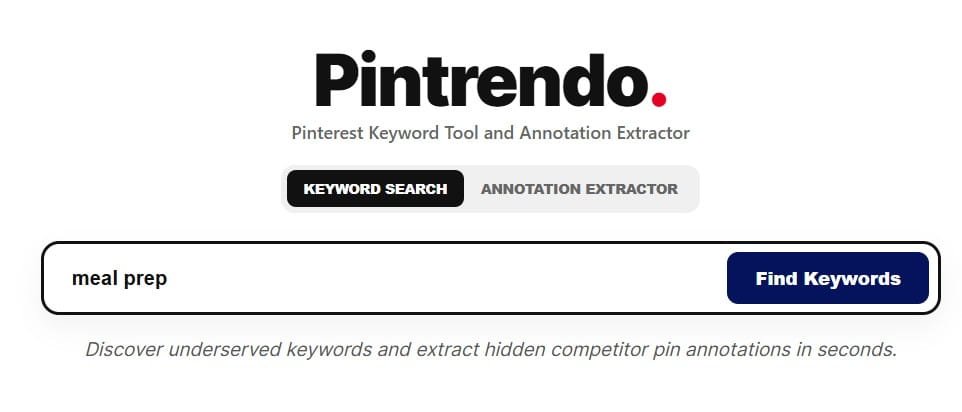
2. Pintrendo will then give you keyword suggestions for your seed keyword “meal prep”
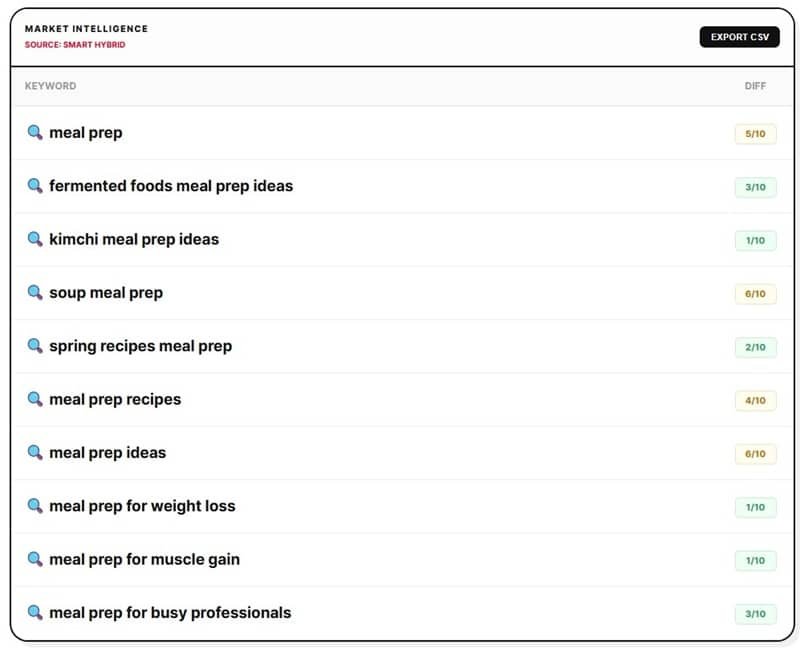
Notice, how Pintrendo has taken care of narrowing down the easy to rank keywords that has decent demand.
If you are skipping this step, then follow the manual process as below.
2.) Validate Using Pinterest Guided Search (Tokens)
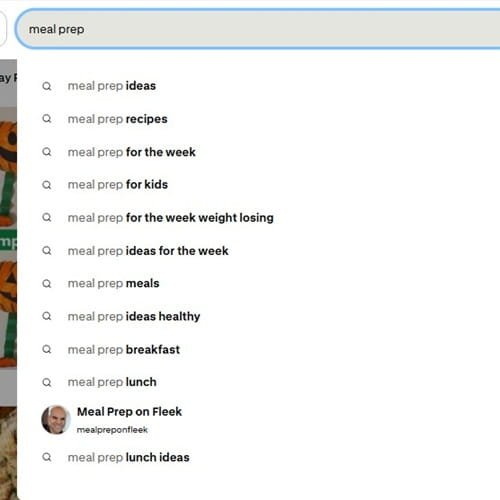
Type your seed term into the Pinterest search bar.
Look at the search suggestions and coloured guide search bubbles to get your tokens.
Meal Prep Suggestions: Meal Prep Ideas, Meal Prep Recipes, meal prep for the week, meal prep for kids and so on…
It is important to note that Pinterest users are looking for visual actionable content.
If your modifier from Google Keyword Planner for example “Meal Prep PDF download” isn’t appearing in the search suggestions, discard this token.
Also, if you look at the suggestions, Pinterest is only giving you the autosuggest data which is broad.
In other words, it wont give you that detailed keywords to target that has decent demand and easy to rank too (that analysis is missing here).
3.) Look At Seasonality Vectors Using Pinterest Trends
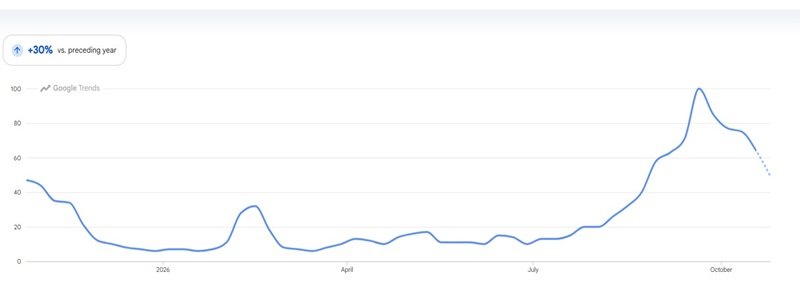
Pinterest will experience a spike in searches 30-90 days before Google.
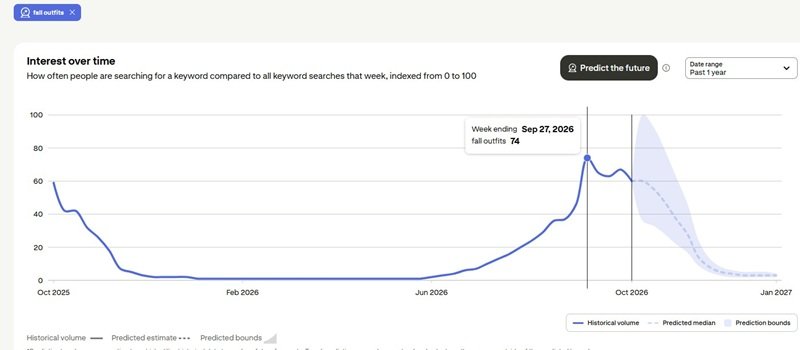
To ensure your queries are valid you can use the Pinterest Trends tool.
Look at the volume of your query over a 12 month period.
Look at when your query peaks. For example, Fall Outfits will peak on Pinterest at the end of August/beginning of September but will peak on Google in September/October.
Trend on Pinterest:
Trend on Google:
4.) Perform Visual SERP Alignment
Type your target query into Pinterest and look at the top 10 results.
Are they using Infographics, Vertical Video Pins, Product Close Ups or Step by step Collage Pins?
Even if you optimize your keywords, if all the top 10 results for Healthy Dinner Recipes are 9:16 Vertical Video Pins then your static graphic won’t perform well.
Final Thoughts
Search Engine ranking is now based on context vectors, entity distance and micro intents.
Using Google Keyword Planner will cause issues with your content strategy.
Google will measure text based queries and the volume of quick answers or information.
Pinterest on the other hand is a visual search engine meaning it uses many visual entities.
This makes Pinterest Keyword Research completely different and an essential part to include.
To ensure your content ranks in the Pinterest Smart Feed and Guided Search:
Use Third Party Data As Seed Data Only: Don’t use the Google volumes to validate your visual demand, use it to get base candidate entities.
Validate Candidates Using Native Signals: Validate all your candidate topics using native signals like guided search token suggestions, seasonality changes and visual SERP.
Visual Entities Match: Ensure your media assets have computer vision signatures matching your text entities in your titles, descriptions and boards.
Ensure you’re getting constant real time token data and visual demand scores using the Pintrendo Pinterest Keyword Tool.
<< Back To Pinterest Keyword Research FAQs