Pinterest Keyword Research: The Ultimate Guide
If you are finding it difficult to get any traction on Pinterest, the issue is not your content, but your keywords.
Although 97% of searches on Pinterest are unbranded, few people capitalize on this fact through the use of the right keywords.
And these are the exact steps I use for finding Pinterest keywords. Doing this, I have been able to increase my Pinterest traffic from 500 to 68315 visitors a month.
In this step-by-step guide, I will share how you can easily find high-quality Pinterest keywords and even introduce my own Pinterest Keyword Tool (Pintrendo).
Understanding Pinterest Keyword Basics
Before proceeding with ways of doing Pinterest keyword research, you should learn everything about the basics of Pinterest search first.
Pinterest Is a Visual Search Engine, Not Social Network
Pinterest is not the same as Instagram or facebook.
It shares similar traits with google. The only difference is google is text based and Pinterest is graphics based.
In terms of search volume google is still a leader however 5+ billion searches is not a low volume either which Pinterest processes every month.
And that 5+ billion searches that happen has a high on page time.
Meaning on an average, a user sees at least 3 pins before they leave, giving you ample scope to get traffic.
With Pinterest the thing is people perform a search query to find answers to their questions.
Your posts get discovered via search ranking, not via the amount of followers you have.
Include Pinterest keywords in these locations…
There are five key spots where keywords can be included on Pinterest:
Pin Titles – Pin titles are extremely important factor after the visual itself. Ideal keyword rich title should be about 40 to 70 characters max). Even though Pinterest allows up to 100 characters, keep the length to under 7 wherever possible.
Pin Descriptions – Include 2 or 3 variants of keywords (200 to 500 characters)
Board Titles – Should describe your boards using keywords
Board Descriptions – Describe your board contents using keywords (150-500 characters)
Profile Keywords – Incorporate your niche keywords in your profile and bio
Note: Hashtags on Pinterest do not play much of an important role as compared to the above-mentioned five categories.
Understanding Keyword Intent on Pinterest
When doing keyword research, you must keep in mind that each keyword has an intent behind.
In Pinterest, mostly there are three types of intent:
Inspirational Intent: Majority of users searching on Pinterest sits here. These are those types of users who are looking for ideas and inspiration only. For example: they may search for “wedding hairstyles,” “living room decor ideas”). These are mostly people searching just to get the ideas.
Informational Intent: People willing to learn something or get information about something fall into this category. For example people who want to start a blog will search “how to start a blog,” similarly parent searching “watercolor painting tutorial” are mostly looking for coloring activity for their kids.
Transactional Intent: There are certain keywords directly associated with these types of query. For example “buy handmade jewelry” OR “buy clay jewelry”. Users who search these types of key phrases are actually looking to buy.
How to Get Pinterest Keywords: 6+ Techniques You Can Try Today
Expensive tools are not required for discovering your keywords.
I have tested six methods listed below, ranging from beginner to advanced levels, and my unique tool Pintrendo among others.
| Method | Difficulty | Cost | Suitable For |
|---|---|---|---|
| Pinterest Built-In Tools | Beginner | Free | Ideal for those who are getting started & want to discover trends |
| Canva | Beginner | Free | Best for those who work in Canva. Only skill needed is to search the template for occasions. |
| Etsy | Intermediate | Free | Product sellers, specific niches |
| Google Tools | Intermediate | Free | Cross-platform strategy |
| Competitor Analysis | Advanced | Free | Established accounts |
| Pintrendo | Beginner-Advanced | FREE | Complete keyword analysis with annotations |
Now let us review all these methods one by one.
Method 1: Using Pinterest’s Built-In Keyword Research Tools
I see people going crazy of tools and wanting to find a magical solution. But sometimes, things already exists undeneath your eyes. What I mean is the best keyword research tool is actually free and already on Pinterest.
Here’s how to use it like a pro.
Pinterest Search Bar Autocomplete
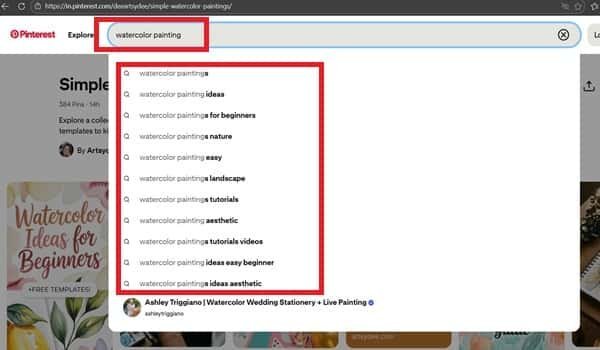
This is the fastest way to discover what people are actually searching for on Pinterest.
Step-by-step process:
- Open Pinterest (use incognito mode for unbiased results)
- Type your seed keyword in the search bar
- Notice the autocomplete suggestions that appear
- Screenshot or write down these suggestions
- Test variations of your keyword (singular, plural, with modifiers)
Example: Type “watercolor painting” and you’ll see suggestions like:
- watercolor painting for beginners
- watercolor painting easy
- watercolor painting ideas
- watercolor painting tutorial
- watercolor painting techniques
These autocomplete suggestions are pure gold – they represent actual searches people are making right now.
Pinterest Trends Tool
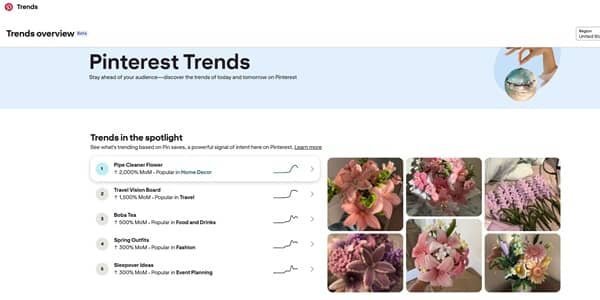
Pinterest Trends (trends.pinterest.com) actually shows you search volume over time and it screams what’s seasonal and what’s about to explode.
Here’s how to do it properly:
Step One: Go to trends.pinterest.com
Step Two: Type keyword relevant to your niche Look at the graph depicting the search volume for the past 12 months
Step Three: Notice peak periods (this is when you should begin pinning)
Step Four: Also, don’t forget to look at related searches at the bottom
Limitations to know: Pinterest Trends show relative interest (not absolute numbers), and very niche keywords may not have enough data. I suggest take the seed keyword from here and then do a search validation on Pintrendo to see different angles.
Guided Search & Related Searches
After performing a search, Pinterest shows “guided search” bubbles at the top of results and “related searches” at the bottom. These reveal long-tail keyword variations.
How to mine these:
- Search for your main keyword
- Click through the guided search bubbles to see what refines your search
- Scroll to the bottom to see “Related searches”
- Each bubble represents a keyword combination that’s working
- Identify the top pins in your Pinterest analytics and refresh your top pins every 90 days with updated keywords
- Use natural language and write for humans first, optimize for Pinterest second
- Test seasonal variations of evergreen keywords (“easy dinner recipes” vs. “easy Thanksgiving side dishes”)
- Save high-performing pins to multiple relevant boards to maximize reach
Method 2: Pinterest Keyword Research Using Canva
Canva’s Pinterest templates reveal what keywords designers are optimizing for – and what’s currently trending in visual content.
Reason Why This Works
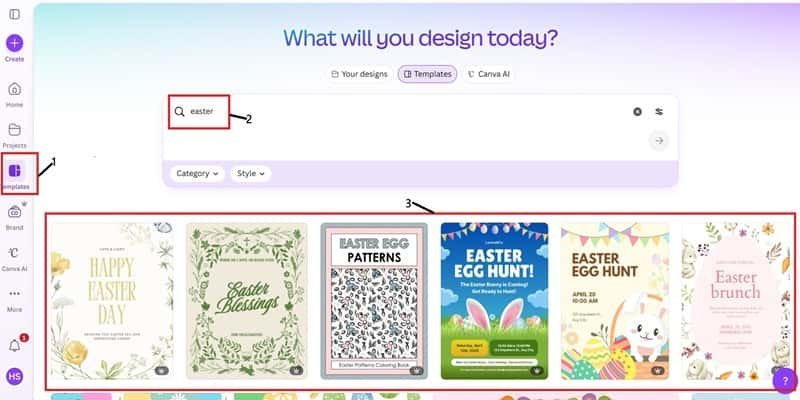
Creators of Canva templates have worked to make their titles and descriptions searchable.
When you see thousands of templates for “minimalist wedding invitations” or “boho Instagram stories,” you get to understand that such terms are popular searches.
Quick Overview of the Process
A Quick Walk-through the Process
Step 1: Go to the Canva website Canva.com
Step 2: Type “Pinterest Pin” or any niche of your interest
Step 3: Look at the titles and descriptions of popular templates
Step 4: Get the keywords from the most popular templates
Step 5: Look up these keywords on Pinterest
Limitations
Template trends lag actual Pinterest trends by several weeks which means you will have to be spot on with the event timings. That mean you should know that specific event.. for example: Easter, Diwali or New Year.
🎯 Want the Complete Canva Framework?
This is just the overview. For my complete Canva keyword research framework with real examples and a downloadable template, read:
→ Pinterest Keyword Research Using Canva + My Exact Framework
Method 3: Pinterest Keyword Research Using Etsy Search
Pinterest is a major traffic source for Etsy sellers, which means what ranks on Etsy often performs exceptionally well on Pinterest.
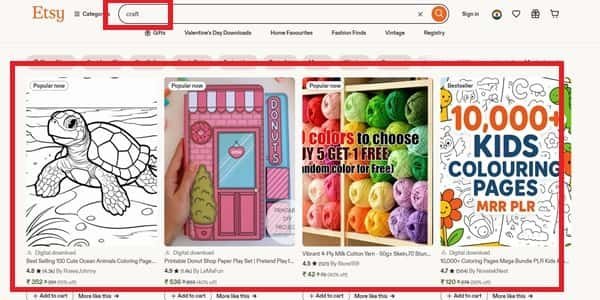
Why Etsy and Pinterest Are Related?
Etsy search algorithms give preference to similar metrics like Pinterest does: keyword relevancy, engagement metrics and user behavior.
The most valuable thing is that the data on Etsy come from buyers who are looking to buy something, exactly who you need on Pinterest.
These are the steps to discover Untapped Keywords on ETSY
The following are the steps you will need to take to discover low competition keywords in Etsy.
First, login to etsy.com and input your niche into the search box. While typing your keyword, ensure that you pay close attention to the auto suggestion from Etsy.
Next, what you are supposed to do is select a product randomly and conduct quick analysis of the keywords and descriptions of the product.
This time around, just add a little personal touch to the above step.
🎯 Ready for the Detailed Tutorial?
Learn exact method to get → Pinterest Keyword Research Using Etsy
Method 4: Pinterest Keyword Research Using Amazon
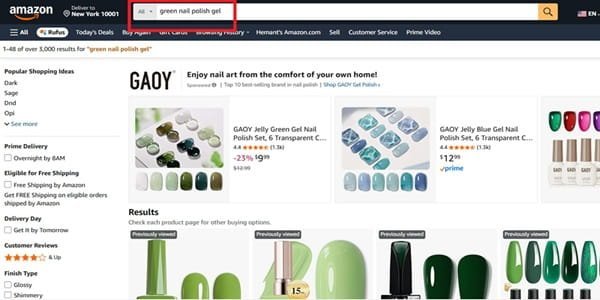
Now, this may look unconventional and sound little off.
But hundreds and thousands of people are already doing conventional way of keyword research on Pinterest.
In most cases, people usually start with Pinterest keyword research inside Pinterest itself.
But I don’t.
Along with all the methods which I discussed above I also use Amazon for my research.
I use this technique especially when my goal is to sell Amazon product as an affiliate (but only the ones that have decent demand on Pinterest).
Here’s the simple process to identify the keywords that actually give me the opportunity to rank:
==>Visit Amazon and look up the niche keyword (such as “green gel polish”).
==>Look at the auto-complete and top search suggestions.
==>List the repeat customer-based keywords.
==>Confirm your keyword in Pinterest using the auto-suggestion feature and search.
==>Once you have confirmed that there’s enough demand use Pintrendo to identify the long-tailed angles that are not covered yet.
==>Next step is to write the article/blog post and then create several pins to support your blog.
Read The Guide: Pinterest Keyword Research Using Amazon
Method 5: Using Google
I know this may sound a little weird at first but the keyword research technique shown here can help you expand the reach in both Google and Pinterest.
Why Google Matters for Pinterest
When many Pinterest users go searching, they often begin at Google before narrowing down their search on Pinterest.
With keywords that help optimize on both sites, you increase your discoverability.
Google Autocomplete Technique
- Enter your seed keyword into Google search
- Take note of the autocomplete results
- Match these with Pinterest autocomplete results
- Discover the matching keywords; these will work on both sites
Answer The Public
Answer The Public (answerthepublic.com) is a free tool that visualizes question-based searches around any keyword.
How to use it for Pinterest:
- Enter your niche keyword
- Review the “questions” section (how, what, why, where, when)
- These question-based keywords work excellently for blog content that you’ll promote on Pinterest
- Export the data for future reference
Google Keyword Planner
While designed for Google Ads, Keyword Planner can inform your Pinterest strategy.
How to access for free:
- Create a free Google Ads account
- Navigate to Tools → Keyword Planner
- Enter your keywords
- Review search volume estimates and related keywords
Important caveat: Google search volume doesn’t directly translate to Pinterest volume, but it indicates general interest in topics.
Method 6: Research Your Competitiors Keyphrases & Keywords
Your competitors, who have been successful, have done all the tests.
Learn from their successes without going around in circles.
Manual Competitor Analysis Strategy
Step 1: Find 5-10 Leading Accounts in Your Market Niches
Find verified accounts or those having 10k+ followers
Accounts that show steady growth lately are preferred
Accounts targeting the same audience as you
Step 2: Check Their Best Pins
Go to their page and sort it by “Most popular” and take screenshots of the most engaging pins (the most saved/shared)
Then extract the keywords from the pin title and description and see what makes them special.
Step 3: Review Their Board Structure
The board names contain a lot of keywords – they are a source of primary keywords
Descriptions show how they use keywords
See how they organize their content (it tells about their content pillars)
Step 4: Note Patterns in Excel
What are the common keywords used in their best pins?
Which description format works the best? (long/short, casual/professional)
What calls-to-action do they use?
Which is the style of pin design?
Tools That Help with Competitor Analysis
- Pinterest Analytics (free) – Track your own performance to understand what works
- Tailwind (paid) – Offers competitor monitoring features
- Manual spreadsheet monitoring – (free) – Sometimes old ways are better ways
Ethical Considerations
What you SHOULD do:
- Analyze their keyword strategy and learn their angles
- Fill in the gaps that they have left behind in the keywords, such as they may discuss clay crafts but miss out on discussing cornstarch clay crafts.
- Understand what will suit your mutual audience well
- Use their keywords with your personal touch
What you should NEVER do:
- Do not replicate their descriptions on pins directly. Instead, use it as a tool to obtain key information like key words and annotations used.
- Replicating their board layout is never helpful. It will just make your site look generic.
- Copy their designs
- Use their keywords (may result in permanent ban).
Method 7: Use Pintrendo for Advanced Pinterest Keyword Research
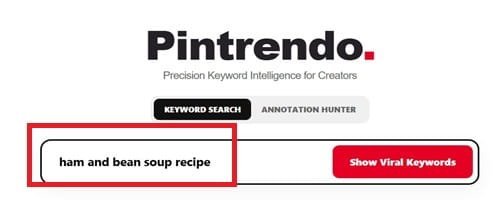
To build on these useful methods, I created a unique tool (Pintrendo) that extracts Pinterest-specific keyword data and analyzes why specific keywords perform well.
What is Pintrendo?
Pintrendo is my own custom-designed Pinterest keyword research tool. Here are its main features:
Pinterest-Specific Search Volume Data – Unlike SEO tools, Pintrendo fetches search volume data from Pinterest
Keyword Annotations – Extra data provided for every single keyword: seasonality, competitiveness and content recommendations
Long-Tail Keywords Discovery – Discovering of specific and low-competitive keywords that bigger tools can’t catch
Trends – Getting data on how keywords peak and at what times it is better to pin them
Specific Niche Keywords Suggestions – Suggestions of keywords for your particular business
How to Use Pintrendo for Keyword Research
Step 1: Enter Your Seed Keyword
Start with a broad keyword in your niche (e.g., “watercolor painting,” “healthy recipes,” “home organization”).
Step 2: Review Keyword Suggestions with Annotations
Pintrendo returns a list of related keywords:
- Search Volume Indicator: High, Medium, or Low monthly searches
- Competition Level: How difficult it is to rank for this keyword
Step 4: Extract Annotations
Once you have finalized your target keyword, head over to Pinterest do a quick search on Pinterest and copy the URL of top ranking pin.
Next, paste the link in Pintrendo’s annotation feature and extract the annotations.
These are to be used in blog post as well as description.
In case you want to know what annotations are and how it works I have explained the concept of Pinterest Annotations in details here.
Step 5: Export and Implement
Export your keyword list to a spreadsheet. You can do the same for annotations as well.
When to Use what methods…
| Scenario | Choose Free Methods | Choose Pintrendo |
|---|---|---|
| If you are just getting started | ✅ | – |
| You have limited time for research | ✅ | – |
| You need fast keyword suggestions | ✅ | – |
| You’re looking forward to 3-6 months | – | ✅ |
| If you are or want to manage several Pinterest accounts | – | ✅ |
| You require Pinterest specific volume and difficulty | – | ✅ |
| If you dont have the knowledge of season and trends on Pinterest | – | ✅ |
| When you are short on time and you want to reduce laborious work | – | ✅ |
🚀 Try Pintrendo for Your Niche
Stop spending hours on manual keyword research.
My Complete Pinterest Keyword Research Framework
Quick Note: Finding keywords is only half the battle. If you want to know how I turn these keywords into an authentic, future-proof content strategy, make sure to read my full guide on The Pintrendo Method after finishing this article.
Now, here is the exact step-by-step workflow I use to structure my research…
Since now you know the individual methods, here’s how to combine them into a systematic process you can repeat for every niche, product, or content pillar.
Step 1: Create Your Niche And Pillars
The first thing you should do is to write down your niche… To see a complete real-world example of this framework applied to a specific market, check out our detailed case study on Pinterest Keyword Research & Dessert Niche Analysis.
How to do this:
The first thing you should do is to write down your niche
Then, you will have to divide it into 3 or 5 pillars (sub-topics)
Then, create a simple spreadsheet for organizing your research
Example:
Main Niche: High Protein Dinner Recipes
Pillars:
When you have chosen High protein dinner recipes as your niche, you will have to choose such pillars as High
Step 2: Generate Seed Keywords
Come up with 5 or 10 generic keywords for each content pillar and try to make sure you incorporate obvious keywords that your readership will use
Speak like your readership does – not how your industry speaks
Example for the “Morning Routines” pillar:
- morning routine
- morning habits
- morning routine
- productive mornings
- morning schedule
Step 3: Extending your research with the right Methods
In order to further your research, you are supposed to perform the following actions:
Add all seed keywords into the above methods and then use Pinterest autocomplete in order to get all recommendations.
Next you should proceed with Canva in order to get trending templates and identify what keywords emerge there.
If you need to generate specific product-related keywords, my suggestion would be to take a look at etsy and see what is being sold there.
And if you want to produce an article with questions, you need to go to Google next.
Use user Pintrendo in order to view the volume data and annotations which can be included into your blog post and pins titles/description.
Time investment: 30 to 45 minutes maximum per one content pillar (or 5 to 10 minutes with Pintrendo)
Step 4: Prioritizing & Organizing Keywords
Simply create a spreadsheet and assign the below items so that you can track and prioritize your work.
Keyword
Search Volume – This helps you to sort High, Medium, Low competitions depending on Pintrendo suggestions).
Competition – Pintrendo gives you difficulty score as well, just put the difficult as Pintrendo recommends
Intent – You need to perform a quick check for all the keywords one by one to see what type of results populate and based on your understanding you can define it into three categories i.e. Inspiration, Information, Transaction.
Priority – Assign a priority for each keywords for example if you are planning this in December then Valantines has to be the top priority. So assign the priority to High, Medium, Low acordingly.
Notes – This is for your understanding.
Prioritization criteria:
- High Priority: You need to be a little start here… therefore always look for a strong autocomplete suggestions + low competition phrases + One that matches your content perfectly, if all these criteria’s are met, put them in high priority list.
- Medium Priority: Some autocomplete suggestions/phrases identified by Pintrendo + medium competition + good match should fall into the medium criteria category
- Low Priority: No autocomplete + high competition + doesn’t align
Step 5: Apply Across Your Pinterest Account
Use your keywords on the following places:
Profile:
In the Name section (if related to your brand)
Bio or About section
Description of Website
Boards:
Board Names (use primary keywords, be descriptive)
Board Descriptions (150 – 500 characters, keyword rich)
Pins:
Pin Titles (40 – 100 characters, use keywords up front)
Descriptions: Description of Pins from 300 to 500 characters maximum. While writing, you should use 3 to 4 keywords maximum.
Alt-text is also very important for SEO.
Hashtags are something that has lost its importance these days but if you still want to use
Step 6: Measure Progress & Stick to What Works
With each project you do, you must measure your progress.
You cannot do any project without measuring your progress because otherwise you would just keep going on with the actions that will never get you your results.
What to track on Pinterest Analytics:
- I would say you should first try out your pin impressions. See how many people are viewing your pins.
- Check which keywords drive traffic to your website, Pinterest shows your top performing pins in the analytics.
- Also check your top boards… just scroll down in the analytics on Pinterest to know which boards are performing well for you.
- Seasonal trends in your niche
Tweaking the strategy:
Make it a habit each quarter to update the top pins with refreshed keywords.
If you can, keep track of the Pinterest trends for any additional opportunities within your niche. Pinterest does provide some clues about this on their homepage.
In conclusion, keep an eye on what is succeeding and duplicate it.
Pinterest Keyword Research Best Practices & Advanced Tips
Seasonal Keyword Planning
Why it is important: The Pinterest users plan 2 to 5 months in advance for special occasions.
Steps for planning your seasonal strategy:
January: Plan summer keywords (content June-August)
April: Plan fall and back-to-school keywords (content September-October)
July: Plan holiday keywords (content November-December)
October: Plan New Year and winter keywords (content January-February)
For instance, instead of pinning “Christmas cookie recipes” in December, do it in September. Pins for this type of content have been selected by the Pinterest algorithm to appear at the top in December.
Long-Tail vs. Short-Tail Keywords on Pinterest
Long tailed keywords (These are generally longer than 3 or 4 words):
Examples: “cheap rustic outdoor wedding ideas” OR “dinner recipes for picky eaters”
Advantages: Better conversion
Disadvantages: Less volume
Short Tail Keywords (1-2 words)
Examples: “Wedding ideas”, “Healthy recipes”, “Home decorations”
Advantages: Very high search volume, broad reach
Disadvantages: Extremely competitive, vague intent, difficult to rank
Strategy: Leverage both to create an authoritative reputation.
Keyword Density & Placement
Where keywords matter most (in order of importance):
- Pin Titles (Highest algorithmic weight)
- Board Names
- First 50 characters of pin description
- Board descriptions
- Hashtags (Minimal impact – don’t rely on these)
Optimal keyword density:
- Do not cram in too many keywords unnaturally (you might be penalized by Pinterest)
- Include 2-3 variations of keywords in each pin description
- Your main keyword should be included in both pin title and first line of description
A/B Testing Your Keywords
What to test:
- Create 2 pins for the same blog post/product with different keyword focuses
- Example: “Home office ideas” vs. “Small home office ideas on a budget”
- Track performance in Pinterest Analytics for 30 days
- Scale the winner by creating more variations
Essential Pinterest Keyword Research Tools & Resources
Free Tools
- Pintrendo (autocomplete) – The #1 Free Pinterest Keyword Tool, shows real user search competition/keywords/underserved topics + it has most premium tools lack i.e. Annotations.
- Pinterest Search Bar (autocomplete) – The #1 free tool, shows real user searches
- Pinterest Trends (trends.pinterest.com) – Search volume over time, seasonal insights
- Canva – Template research for trending keywords
- Etsy – Product keyword research for sellers
- Google Keyword Planner – Supplementary data for cross-platform strategy
- Answer The Public (free tier) – Question-based keyword ideas
- Pinterest Analytics – Track your own performance data (requires business account)

About Me!
I am Hemant and I have been building websites since 2011 and working seriously with Pinterest since 2015. After years of algorithm hits, Pinterest penalties, failed experiments and successful case studies, I built Pintrendo around the systems I use to research, test and manage Pinterest accounts for my clients. Today, I work with global client accounts and build tools based on hands-on testing, not recycled Pinterest advice. Read More…