Most creators stop too early.
They open Canva.
They type a keyword.
They see templates.
They feel excited.
And then?
They create one pin and wait for the traffic.
That’s the mistake.
This Canva centric Pinterest Keyword Research can be extremely powerful, however, it only works if you validate and expand those keywords with a proper Pinterest Keyword Tool and then structure the content around them.
In this post, I break down each steps and show you:
- The validation layer inside Canva
- The expansion layer most people miss
- The content structuring formula
- The 10-pin multiplication method
- The ranking psychology behind seasonal keywords
Step 1: Understanding What Canva Is Really Showing You
When you type a keyword like “Easter” inside Canva’s template search, you are technically looking at demand signals.
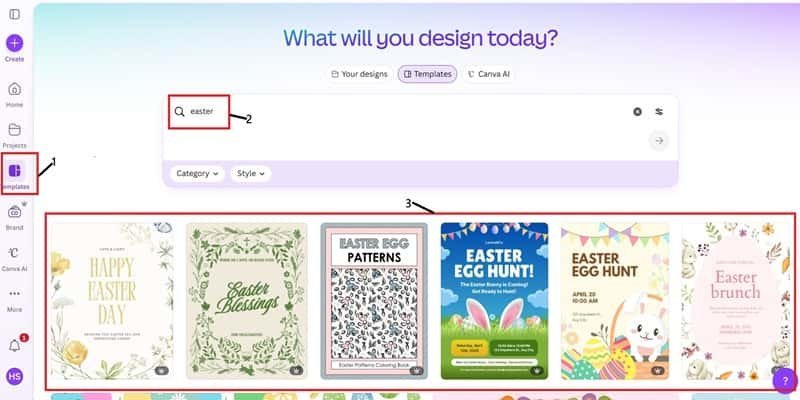
Think about this.
Canva is a billion-dollar company.
They do not build random templates.
Big organizations try to be efficient with their moves, so with Canva the templates are build based on user behavior and the demand they expect.
If you see:
- Easter Hunt
- Easter Brunch
- Easter Egg Pattern
- Easter Blessings
That means people are actively creating content around those themes.
Templates exist because demand exists.
If Canva has a template that screams keywords all over the template, it means you have validated the market before you even touch Pinterest.
That’s the first layer of Pinterest Keyword Research Using Canva.
Step 2: Why Most People Still Don’t Rank
Here’s where people mess up.
They take “Easter Hunt” and create one blog post titled:
“Easter Hunt Ideas”
Too broad.
Too competitive.
Too generic.
That’s not how you do it… you must break broad keywords into long-tail content clusters.
You need to be specific here.
Instead of:
Easter Hunt Ideas
You want:
Easter Hunt Ideas for Toddlers Indoors
Easter Hunt Clues Printable PDF
Backyard Easter Hunt Setup on Budget
Easter Scavenger Hunt for Classroom
See the difference?
Broad = crowded
More specific = More opportunities
Pinterest Keyword Research Using Canva is only step one.
Now we expand.
Step 3: The Keyword Expansion Framework
- Find a validated template keyword inside Canva.
- Take that phrase to Pintrendo – Pinterest Keyword Tool.
- Collate the list of keywords which is rated as “Low difficulty”.
- Enter the shortlisted keyword into Pinterest and then check out the top pins.
- Pay attention to the wording.
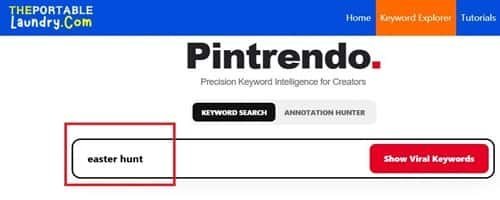
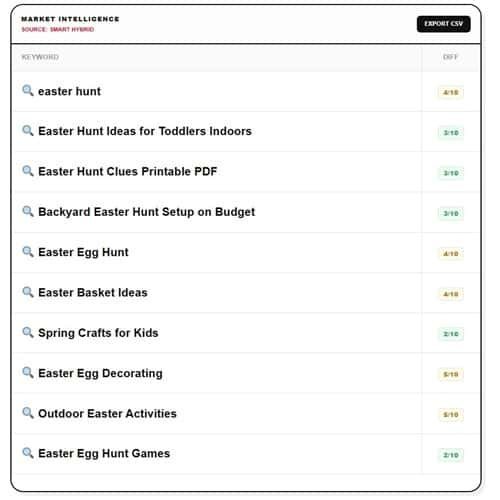
This is no guess work.
If you do this via traditional pinterest search, you can start by typing the seed keyword and learning the pattern (Pintrendo eases this out and only suggests something you can easily rank for).
For example:
“Easter Hunt”
Pinterest might suggest:
- Easter Hunt Ideas for Kids
- Easter Hunt Clues
- Easter Hunt Prizes
- Easter Hunt Indoor
That’s your content roadmap.
Each suggestion can become:
- A standalone blog post
- Or a content section
- Or a dedicated pin angle
Now we’re stacking intent.
This research stage is the foundation of the Pintrendo Method. Everything after it, from article structure to pin variations, builds on keywords you have validated, and because it is based on search intent rather than algorithm tricks, it keeps working when Pinterest changes.
Step 4: Post or Article Structure
Pinterest doesn’t rank good articles.
Pinterest ranks intent.
And this is how my blog posts look like:
1. Intent-Driven Headline
Not:
Cute Easter Hunt Ideas
But:
A real pin example from our test site
See this? The title needs to grab the attention real quick.
Users on Pinterest scan real fast, therefore you must be clear…. clarity always wins.
2. Strong Opening Paragraph (First 100 Words Matter)
Pinterest reads context.
Use your main keyword naturally in the first 100 words.
However, don’t overstuff it.
Try Mentioning:
- Easter Hunt Ideas
- Indoor Easter Activities
- Kids Easter Games
- And so on…
3. Use Smart subheadings
Consciously make an attempt to write your H2s like a search query.
Example:
- How to Set Up an Indoor Easter Hunt
- Best Easter Hunt Clues for Toddlers
- Cheap Easter Hunt Prize Ideas
- Creative Backyard Easter Hunt Themes
When you do this… it basically means you are making your subheading a potential long-tail ranking opportunity.
This is strategic structuring.
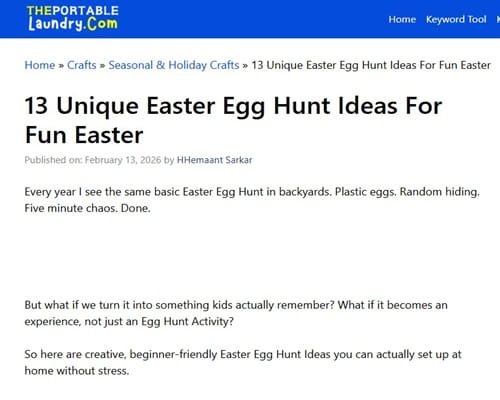
Here’s the example article which I have managed to nail it and guess what, it’s performing extremely well on Pinterest (I don’t just write theories, I show things that have worked for me and there is no reason why it won’t work for you…).
Step 5: The 10-Pin Multiplication Strategy
Now this is where real growth happens.
Let’s say your blog post is:
Indoor Easter Hunt Ideas for Kids
You don’t create one pin.
You create 10 variations.
Here’s how I break it down:
- Problem-focused angle
“Rainy Day Easter Hunt Ideas” - Age-specific
“Easter Hunt for Toddlers” - Budget angle
“$10 Easter Hunt Setup” - Emotional angle
“Make This Easter Magical for Kids” - Checklist angle
“Indoor Easter Hunt Setup Guide” - Printable angle
“Free Easter Hunt Clues” - Visual-heavy angle
“Cute Easter Hunt Setup Ideas” - Parent-hack angle
“Stress-Free Easter Morning Plan” - Quick solution
“10-Minute Easter Hunt Setup” - Classroom version
“Easter Hunt Ideas for Preschool”
Same blog post.
Different pin psychology.
That’s traffic stacking.
Here’s a quick example of my top performing pin…

Step 6: Pinterest Psychology That Most Creators Overlook
Pinterest is not Instagram; it’s not even Tiktok.
Pinterest is visual… in fact people are there for this exact reason.
And if you use Pinterest for some time, you will notice that everyone using it is a planner.
They visit there for:
Ideas
Solutions
Printables
and more…
So if your content is not giving out anything about an outcome, you won’t convert.
Which is why the Canva Keyword Research trick works perfectly.
Canva templates are already reflecting their intentions.
Step 7: How to Make One Keyword a Content Cluster
Let’s see how this works.
If your main keyword is “Easter Hunt Ideas” your content cluster will be something like this.
Post 1: Indoor Easter Hunt Ideas for Kids
Post 2: Outdoor Backyard Easter Hunt Setup
Post 3: Easter Hunt Clues Printable
Post 4: Easter Hunt Prizes for Different Age Groups
Post 5: Easter Scavenger Hunt for Classroom
This is how you build topical authority.
Topic authority is built by creating content on relevant keywords. You not only add value by doing that but also get what Pinterest needs.
Step 8: How to Execute It (Start This Week)
Here is the deal.
When you decide to use these Pinterest Keyword Research Tips for Canva in action this is how you should execute them.
Open Canva
Select three seasonal keywords
Brainstorm 5 variations per each keyword
Research the search suggestions in expanded versions of your keywords. This is where you will find low competition high traffic keywords for Pinterest.
Write one blog post.
Create 5-10 variations of pins.
And publish all this early in the week.
Do this weekly.
Final Thoughts
After having done research using various tools, I can say Canva can be a nice tool to do the keyword research especially for seasonal traffic.
If you notice, when you login to Canva sometime Canva displays the seasonal templates right on the home screen itself for example: Diwali, Christmas or Thanksgiving day.
The only challenge with this process is noticing it.
Like for example during Diwali you will see the Diwali templates, likewise for Christmas or Thanksgiving day.
But if you can dig deep into Canva and see their ready made templates, you should be able to discover a handful of keywords.
With all that said, I wont recommend this to be a primary method of keyword research.
For proper keyword research, use the authentic keyword tool like Pintrendo.
If you implement this framework exactly as explained, you won’t just create pins.
You’ll build strategic assets that compound season after season.
And that’s when Pinterest starts working for you… instead of you constantly chasing it.