Pintrendo.
Pinterest Keyword Tool and Annotation Extractor
Discover underserved keywords and extract hidden competitor pin annotations in seconds.
Processing Image…
Daily Limit Exceeded
Only 10 attempts allowed per day to keep our engines fast.
Want more data right now?
Learn the art of Pinterest Keyword Research HereOops, it looks like Pinterest hasn’t assigned any annotations to this pin yet.
This often happens with newer pins or ones Pinterest hasn’t fully processed. Try a more established pin, or learn how to build pins that Pinterest understands from day one.
See the Pinterest BlueprintRather skip the learning curve? Get 50 ready-made annotation-infused pins instead.
SCANNING LIVE ENGINES…
| KEYWORD | DIFF |
|---|
Also Try Our Free Tools
Found your keywords? Keep going. Detect, research, organize and create with free tools built for Pinterest creators.
Pinterest AI Text Detector
Audit text originality of your pin copy and blog posts. Check if it sounds human or AI-generated before you publish.
Try it free →Pinterest AI Image Checker
Inspect visual assets for AI labels and metadata before you post on Pinterest or your blog. Works with regular images too.
Try it free →Pinterest Keyword Clusterer & Board Namer
Group keywords into topics and get board names that rank.
Try it free →What is Pintrendo Pinterest Keyword Tool?
Pintrendo is a free, web-based Pinterest keyword research tool that helps you discover high-intent keyword ideas and underserved search angles. Integrated with a powerful Pin Annotation Extractor, Pintrendo fetches the exact visual and semantic annotations associated with top-performing pins, delivering deeper algorithmic insights for any search query. Designed specifically for bloggers, content creators, and digital marketers, it helps you uncover low-competition niche topics, optimize pin metadata, and build future-proof content for visual search engines.
The tools are built around one repeatable workflow: research the topic, study Pinterest search results, understand the language associated with existing pins, create relevant content, and review the finished assets before publishing.
This workflow is called the Pintrendo Method.
Built by Hemant Sarkar, who has been working with websites and online marketing since 2011 and experimenting seriously with Pinterest since 2015. The method has been used and tested across 26+ websites, including owned and client websites.
What Pintrendo Actually Helps You Understand
Pinterest has to understand content before it can connect that content with searches.
For creators, that creates several questions:
What are people searching for?
→ Pinterest keywords and search terms
What topics are related to that search?
→ Keyword clusters and related concepts
How does Pinterest appear to understand existing pins?
→ Annotation and pin analysis
How should I create my content?
→ Relevant articles, pin titles, descriptions and images
Does my finished content contain signals I That Pinterest could possibly flag?
→ Pinterest AI text and image analysis
Pintrendo is built around these relationships.
Keywords → Search → Pins → Annotations → Content → Images → Publishing → Measurement
The goal is not to stuff keywords into content.
The goal is to understand the topic better before creating it.
How The Pintrendo Pinterest Keyword Tool Works
There are two aspects to this tool, this tool focuses on not only finding the underserved keyword topic ideas but also has the annotation feature.
Here’s how this tool works in detail:
1. Pinterest Keyword Finder Tool
The Pinterest Keyword Finder function in our Pinterest keyword tool suite queries live search suggestions to uncover high-intent long-tail keywords, seed terms, and audience interest trends.
Then, it uses an AI layer to analyze the top concepts, and at the backend the analysis happens to figure out what’s the underserved angles and then it returns the results.
So the process is:
Query The Auto-suggest → Find the top keywords → AI Analysis Of the angles and underserved opportunities → Results
So, it’s not like a regular auto-suggestion tool that simply outputs the search auto-suggest data.
We have also put one more layer on this tool where we manually update the database at the backend as and when we discover new keywords.
The major advantage of this manual premium data is that there’s an active human that keeps updating the database at the backend, which means there are keywords and phrases which even autosuggest tools cannot detect.
The manual effort + the Keyword extraction + AI layer on top gives this tool a real advantage.
I have documented a case study here at Pintrendo Method, where we show how we found keywords for the topic where Pinterest showed no data in its autosuggest search box and even in Pinterest trends there was no data, be sure to check that out.
When And How To Use The Keyword Finder Tool
Use this feature when you are brainstorming new blog post ideas, board names, or visual content concepts.
Here’s how to use it:
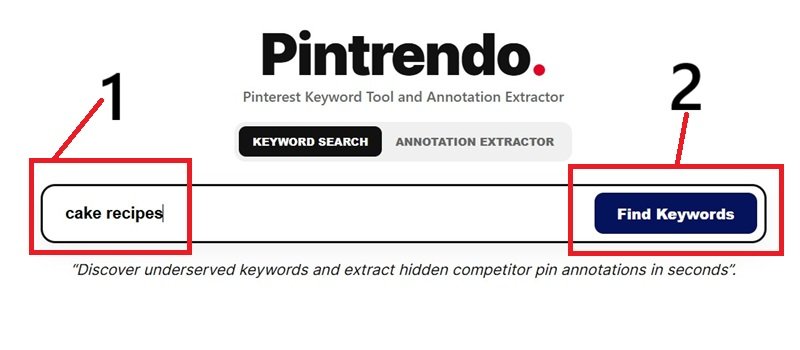
Start by typing the seed keyword, for example if you are into cake recipes niche, type cake recipes and hit the find keyword button, it will look something like this:
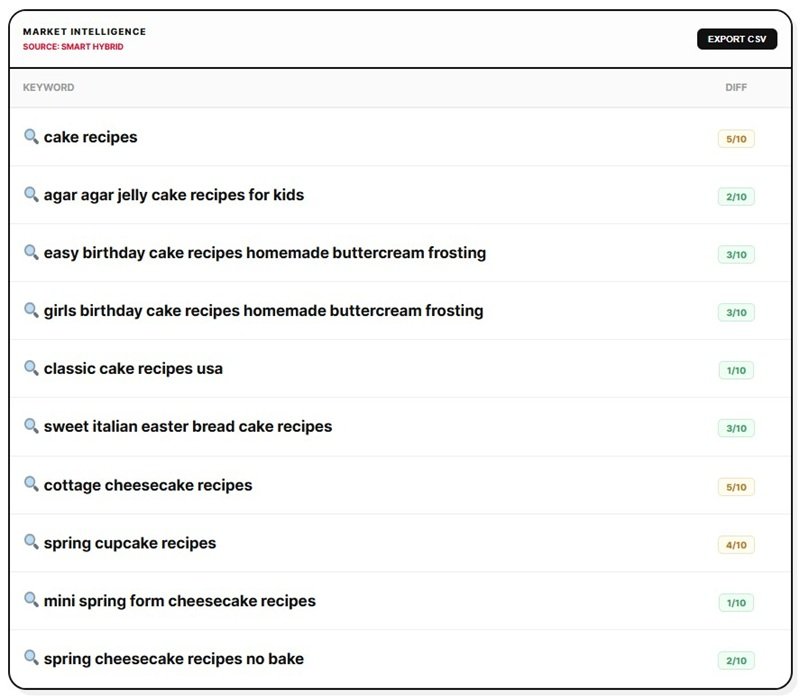
Pintrendo will then give you results which will look like below:
Now, the real trick is that the research does not stop here, it actually begins.
If you look at the magnifying glass next to the results, those are clickable, which means, Pintrendo gives you the drill function.
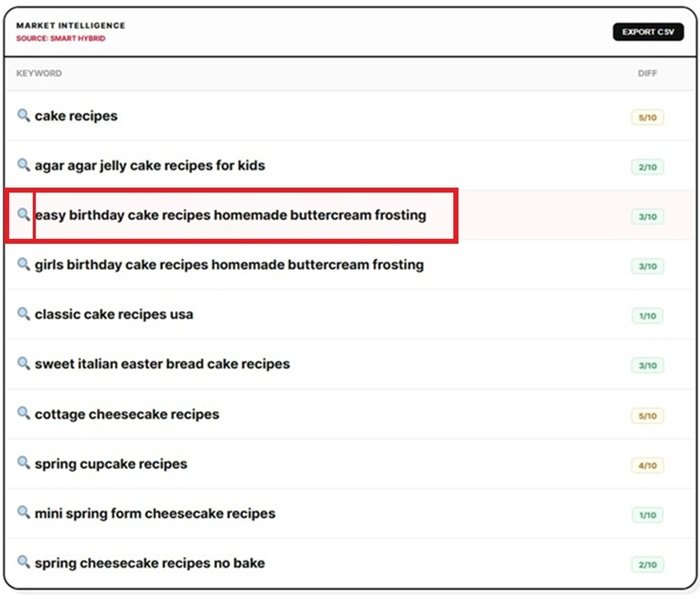
It’s a function that allows you to keep drilling deep, to find keywords that are buried and rarely seen at the surface level.
Also, if you notice at the right side, there’s a keyword difficulty score. It shows you which keywords are relatively easy to rank.
New to Pinterest keyword research? The tool gives you the data; our guide to Pinterest keyword research explains how to choose, group and use those keywords in your content.
2. Pin Annotation Extractor
If you notice, the tool has a toggle function that can be switched to access the annotation extractor.
This annotation extractor works only if you enter a legitimate Pinterest Pin URL.
The Annotation Extractor feature analyzes any public Pinterest Pin URL which you enter in the box.
And if those pins have valid annotations assigned by Pinterest that’s publicly visible, it gives you the results.
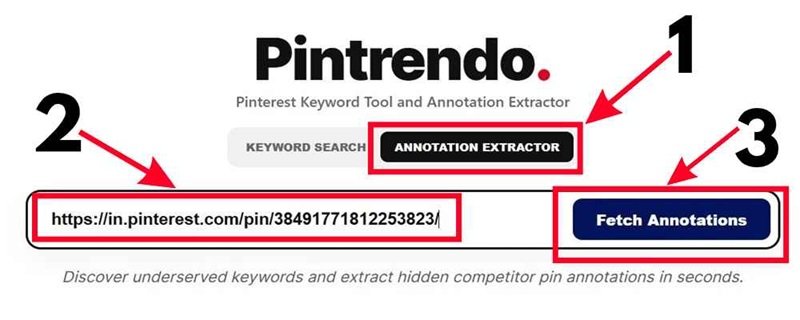
It reveals the underlying semantic annotations assigned to that pin by Pinterest’s algorithm.
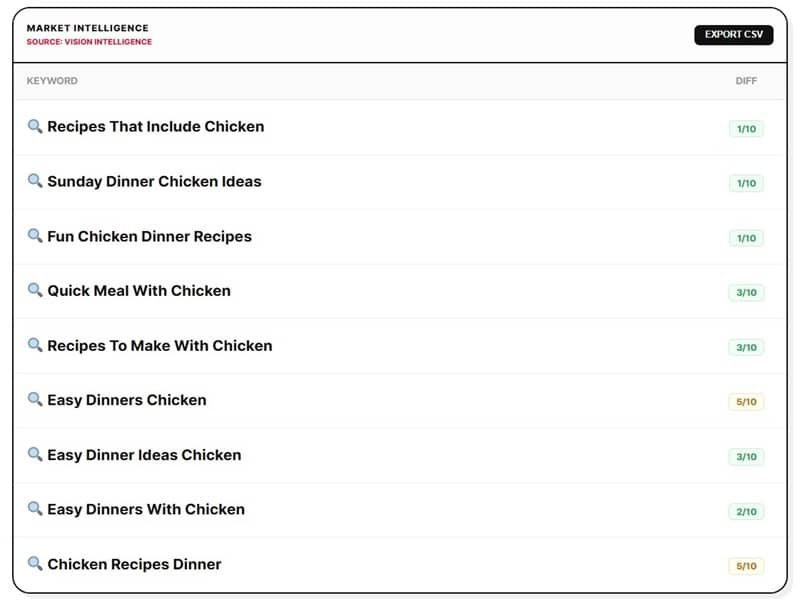
Use this feature when you want to reverse-engineer top-performing competitor pins and see the exact tags Pinterest uses internally.
Also, if you notice the search icon next to the annotations, those are clickable and its a pure goldmine.
No other tool or course will show you this.
When you click on those results, it will do a keyword research again and explore new angles giving you the opportunity to cover angles which is extremely difficult to find otherwise.
What are Annotations?
From a technical SEO standpoint, Pinterest annotations are canonicalized, weighted topical entities (keyphrases) extracted from multi-modal sources (image pixels via computer vision, text overlays, titles, descriptions, destination URLs, and user interaction click-streams) and mapped to a closed-vocabulary Annotation Dictionary.
Rather than relying on raw, noisy token-frequency matrices (like traditional TF-IDF across all raw strings), Pinterest’s retrieval architecture maps a pin into a sparse, high-confidence vector of semantic entities paired with confidence scores.
If that sounds too technical, I have explained What Are Pinterest Annotations In detail here.
Feature Comparison
| Capability | Keyword Finder | Annotation Extractor |
| Primary Input | Seed Keyword (e.g., “cake recipes”) | Pinterest Pin URL |
| Primary Output | Related keyword with difficulty score and drill function. | Hidden pin tags specifically annotations. |
| Primary Purpose | Uncovering new content & topic ideas | Reverse-engineering top competitors |
| Target Audience | Bloggers & Content Strategists | Pinterest SEO Specialists |
Is Pintrendo free to use?
Yes, Pintrendo is a Free Pinterest Keyword Tool & Annotation Extractor.
It’s free to use for both real-time keyword discovery and competitor pin annotation extraction.
Master Framework & Pinterest Resources
The Pintrendo Method
Learn our proprietary 9-stage content workflow for building high-ranking, search-optimized Pinterest content:
Read The Pintrendo Method, its an extensive deep dive with real case study that shows how to use a framework to write the proper blog post, create pins, create titles and descriptions that best aligns with Pinterest best practices + our proprietary methods that future proof the content.
Deep-Dive SEO Guides & Tools
Explore our tutorials, keyword strategies, and visual analysis tools:
- Complete Resources to Pinterest Keyword Research
- Check content safety with the Pinterest AI Text Detector
- Check if your image on Pinterest has the probability of getting flagged as AI with our Pinterest AI Image Detector.
- Have lots of scattered keywords? Get it organized using our Pinterest Keyword Clusterer.
Important Limitations
Pinterest changes its platform, page structure and publicly exposed data over time.
Pintrendo Annotation Extractor may not return results for every pin.
Fresh pins may not have useful annotation data yet. Some pins simply do not expose the information.
That does not necessarily mean the pin has no internal associations.
It means the information is not currently available to Pintrendo through the data it can access.
The same principle applies to AI detection.
Detection results are estimates based on available signals. They should be treated as one input in your review process rather than as definitive proof.
Built From Real Pinterest Work

I’m Hemant Sarkar, founder of Pintrendo.
I’ve been working with websites and online marketing since 2011 and seriously experimenting with Pinterest since 2015.
Over the years, I’ve built websites, managed Pinterest accounts, worked with clients, studied Pinterest search behavior, tested keyword strategies, experimented with publishing systems and learned just as much from failed experiments as successful ones.
Pintrendo grew out of that process.
I did not start by deciding to build a collection of SEO tools.
I built tools because I needed them myself.
The keyword research system came from needing better Pinterest topic research.
Annotation Extractor came from studying Pinterest page data and wanting a practical way to extract the information I was seeing.
The keyword clusterer came from organizing large groups of related Pinterest searches.
The AI detection tools came from wanting a practical way to review the text and images being published.
Today, the Pintrendo Method has been applied across 26+ websites, a mix of my own projects and client sites I manage.
Client sites are kept private, so the public example I can show in detail is ThePortableLaundry and few others which I experiment on.
The results are my own observations, not controlled studies, and they don’t prove how Pinterest’s systems work.
The goal is simple:
Turn what I learn from real Pinterest testing into tools that other creators can use.
Read the full Pintrendo story →
Watch my Pinterest tutorials on YouTube →
Explore the Pinterest Blueprint →
Check our store for Free & Paid resources →
Research better. Create more intentionally. Let your Pinterest content earn its place in search.