A Pinterest keyword tool is a software interface that extracts, structures, and categorizes search query data directly from Pinterest’s internal search engine and advertising database. Using this tool content creators, E-commerce stores and publishers can optimize their content for Pinterest.
Unlike typical search engines (Google etc.), Pinterest is a visual search engine. Users over there search with the intent to discover something new to save and buy.
Using a Pinterest keyword tool like Pintrendo users can use search predictions, pin details, board names and visual search taxonomy.
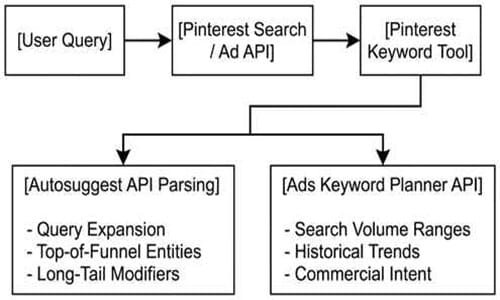
Core Function: How a Pinterest Keyword Tool Operates
To understand how a Pinterest keyword tool works we need to know what data is being pulled from Pinterest.
1. The Autosuggest Engine (Pinterest Guided Search)
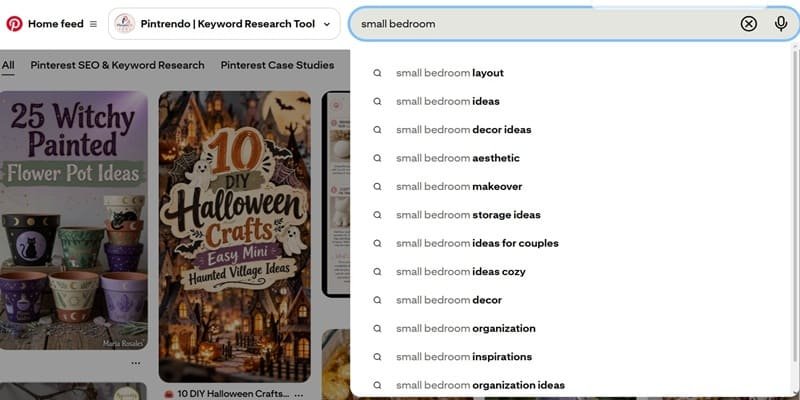
When searching in Pinterest, users type in their query and Pinterest will generate suggestions based on their search.
The Pinterest keyword tool will scrape or request data from these suggestions. This can be done by adding characters to the end of the query you are searching for.
Example: When searching for ‘small bedroom’ the tool will append letters to the end. (small bedroom a, small bedroom b).
This will give you real time data of what people are searching for and what they are looking for based on their search.
2. Pinterest Ads Keyword Planner Data (If using Pinterest Business/API)
For tools integrated with Pinterest’s Business or Advertising API, the tool pulls estimated monthly search volume, demographic split, and competition metrics.
Mechanism: Queries are passed through the Advertising API endpoints to return search index ranges (e.g., 10k–50k monthly searches).
Value: Helps prioritize content production based on quantified demand rather than visual intuition.
How is Pintrendo Pinterest Keyword Tool Different?
Pintrendo Pinterest keyword tool works on the same principle, however, the only and major difference here is that it has the AI filtration and organizing layer in between and it also looks at other sources like wikipedia to study the auto-suggest data before returning the final results.
Also, there is a human layer sitting in the workflow which manually enters the humanly found data into the tool which other keywords tools cannot do.
This allows you to get the final results that actually have demand, unlike other AI based tools which are based on predictive autosuggest.
How Pinterest Keyword Tools Support Content Planning
Content planning on Pinterest requires you to build up your Topical Authority and Entity Relevance. Using broad search terms will dilute Entity Relevance. Using a Pinterest keyword tool can help you identify what micro-topics make up your broad search term.
1. Mapping Seed Keywords to Sub-Entities
Take your seed keyword, e.g. ‘small bedroom’ and using the Pinterest keyword tool you can break it down into different intent focused queries.

- Seed Entity = Small Bedroom
- Child Entities(Modifiers) = Layout, Storage, Aesthetic, Lighting, Furniture
- Long Tail Variations = small bedroom layout with queen bed, small bedroom storage for clothes no closet.
You can group these together so you can focus on creating content that covers the whole entity of small bedroom design.
2. Evaluating Data Sources: Pinterest vs. External Signals
Not all metrics inside a keyword tool represent the same user behavior.
When planning your content it is key to understand when to use Pinterest data over other data sources.
| Data Source | Platform | What It Shows | Best Used For |
| Pinterest API / Guided Search | Pinterest Native | Users searching for visual items, current trends and what pins are trending on Pinterest. | Board creation, Pin titles, Pin descriptions and Overlay text. |
| Google Search Volume | Google Native | Users searching for text based terms, informational searches. | Writing blog posts, URL slugs and creating external landing pages. |
Execution Example: If your other keyword tool is showing a high search volume for ‘how to arrange a small bedroom’ on Google, but your Pinterest Guided Search is showing ‘small bedroom aesthetic layout’ has a higher priority (high demand + low difficulty score), your landing page text needs to include the Google search term. However your Pin Title and Pin Image Text Overlay needs to include the Pinterest image search term (terms you identified using Pinterest Keyword Tool).
Practical Application: Extending Your Pinterest Keyword Strategy
To ensure you get the most out of your search terms and to ensure your content will be highly relevant… set up your keyword research like below:
Step 1: Query Extraction via the Tool
Enter your main topic into the Pinterest Keyword Tool like Pintrendo. This will give you your main entity tree.
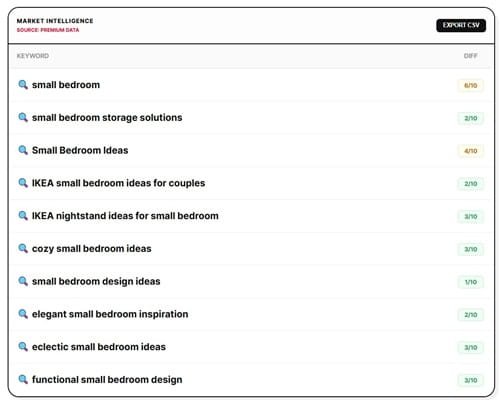
Seed = small bedroom
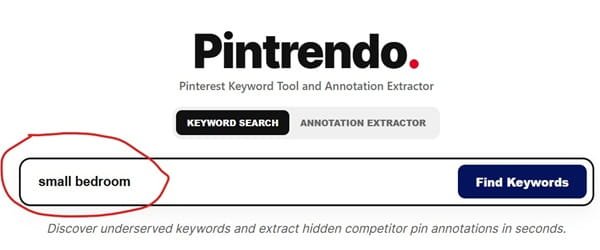
Extracted Nodes = small bedroom storage solutions, small bedroom ideas, IKEA small bedroom ideas for couples, etc.
Step 2: Mapping Keywords to Pin Assets
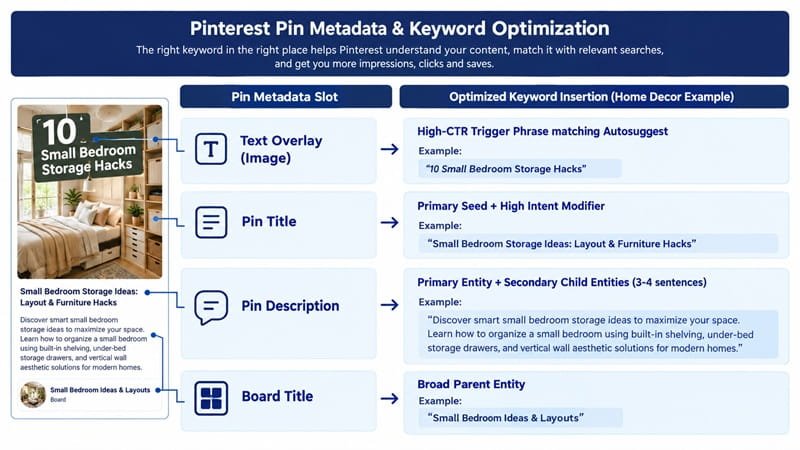
Assign your keywords to their correct metadata.
E.g. Taking ‘small bedroom storage ideas’ and making it your main keyword in your title. Adding ‘under bed storage’ and ‘built in shelving’ to your description.
Your Overlay text should also be optimised to include a relevant search term. And your board name should relate to your topic.
This way your keywords will be spread throughout your metadata.
Here is an visual example of how this works:
Step 3: Validating Demand vs. Chasing Numbers
Search volume will just show you how much volume there is relative to other search terms. Pinterest uses a lot of Visual Graph data.
So it is important to know that whilst using high volume keywords will tell the algorithm where to place your content, the visual interaction (i.e. the clicks, saves, zooms) will determine how long it stays there.
Use the Pinterest keyword tool to give you an idea of what topics you want to cover.
By covering all your child entities you will have a strong topical relevance throughout your account in the form of themed boards and sections within the boards.
Are All Pinterest Keyword Tools Web-based Or Standalone App?
It depends, not all Pinterest keyword tools are app based or web-based. The architecture of the tool depends on the creator. However, the primary query extraction methodology remains the same.
In case of Pintrendo, its a web-based (SaaS) tool that extracts queries and the results are served on web-page.
Final Thoughts
A Pinterest keyword tool is not a search term generator. It is a search term extractor that can help you match your users intent. If you do not use the search terms in a semantic way you will end up with broken relevancy signals.
Tool-level data extraction represents only one layer of a complete optimization strategy.
To turn your search volume into algorithm driven distribution:
Implement the Strategy: Use the search terms from each query to create a full Pinterest Keyword Research strategy. Covering your main, secondary and long tail entities.
Resolve Contextual Discrepancies: Check our Pinterest Keyword Research FAQ to answer any questions you may have.
Head back to our main Pinterest Keyword Tool: To automatically extract entities, pull live modifiers and create visual content based on your data.
Your keywords will show you what people are searching for, but your semantic setup will define your topical authority.
Plan your entities, optimize your metadata and let your visual interaction boost your rankings.
<< Back To Pinterest Keyword Research FAQs