The Pintrendo Method is a nine-stage workflow for researching a topic on Pinterest and turning it into website content and pin assets: Research, Search, Study, Extract, Create, Create Multiple Pin Versions, Cluster, Review, Publish and Measure.
Look, if you have been applying the same old method from 2015 and wondering why Pinterest is not working for you then you are not alone.
I get lots of questions on my Youtube channel as well DMs with queries about the processes or framework that can help them succeed on Pinterest.
Everyone has their own way of doing things, and some may get huge results and for some it may lead to account ban OR sluggish performance.
I have been there and working on Pinterest since 2011 and I have seen the extreme ups where my account was doing 10m+ Monthly views on 2 profiles to getting my account banned.
Since then I have been doing various experiments and observations around Pinterest.
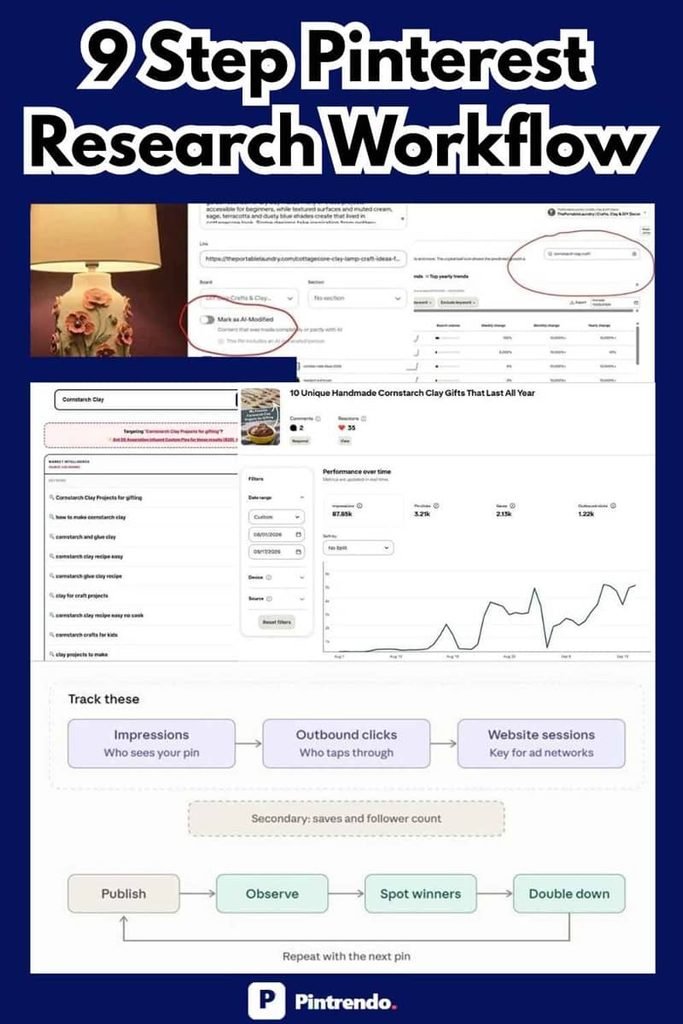
While this process which I am going to discuss may look like a short process, this honestly took years to evolve and finally reached a point where we can say this is a repeatable process.
Today I am going to tell you how you can succeed on Pinterest by being disciplined and following my simple 9 step Pintrendo method.
What Is the Pintrendo Method?
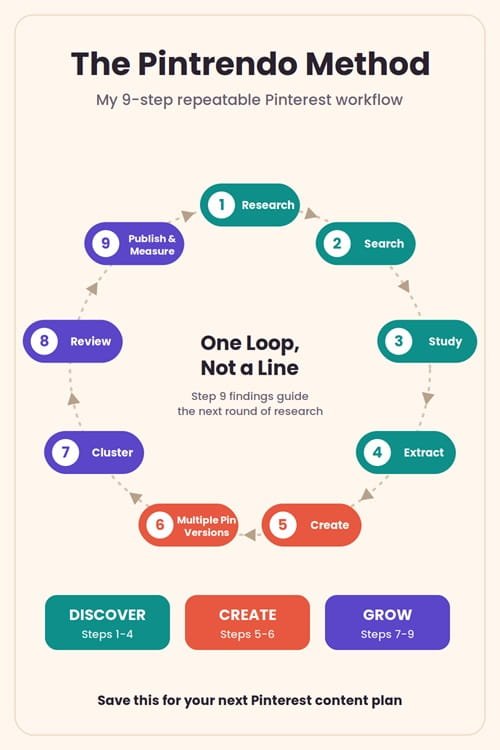
The Pintrendo Method is my nine-stage workflow for researching a topic and turning it into website content and Pinterest assets.
- Research: Find topics and potential search opportunities.
- Search: Investigate those topics directly on Pinterest.
- Study: Examine relevant pins and their destination pages.
- Extract: Collect annotation phrases available from relevant pins.
- Create: Develop useful content around the topic.
- Create Multiple Pin Versions: Present the same content from different relevant angles.
- Cluster: Group related keywords and identify future content opportunities.
- Review: Check the content and images before publishing.
- Publish and Measure: Track performance and use the findings to guide the next round of research.
These stages work together.
The purpose is to make the process repeatable without turning it into something which cannot be sustained in the long run, in other words it should not look like an exercise.
Each stage shown above actually gives me something useful to work with in the next one, that’s the point here.
The Thinking Behind the Pintrendo Method
The logic behind this method is that it almost forces you to start with the topic, not just the keyword.
What I mean is… suppose I want to create content around air-dry clay candle holders.
I could write an article, create a pin, and target that phrase… but wait, there is more to investigate.
People might be looking for boho candle holders, handmade candle holders, clay candle holder ideas, or projects they can make as gifts.
Some of these phrases might deserve separate content.
Others might work better as sections in one article or as alternative Pinterest pin angles.
So, the key here is to understand those relationships before deciding what to publish.
The Pintrendo Method looks something like this:
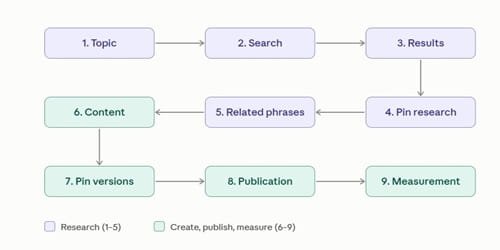
This is why I differ from a keyword-only approach.
Pinterest has to interpret the search and the content it presents to users.
Creators can investigate visible search results, text, images, related topics, and available pin data.
We cannot see or control every signal Pinterest uses internally and that is OK…
Ideally we should be focusing on what we can investigate and improve.
The tools help me do that, but the tools themselves are not the method so the decisions I make using the information are actually what matter.
Stage 1 Of The Pintrendo Method: Research
Finding a Topic Worth Exploring
Sometimes I already have a specific idea in mind mostly due to me scrolling the Pinterest feed and me being active on Pinterest (but you don’t need to do this as for me research on Pinterest Keywords, annotations, visual seo is my subject, it makes sense for me to stay there longer).
Air-dry clay candle holders is one example (this is not random because I am into clay niche on Pinterest testing it on my test sites, hence this example).
On other days, I might start with something broad, such as clay crafts.
The first task is to narrow the topic down to something worth investigating.
In my case I look at several types of keyword angles and opportunities:
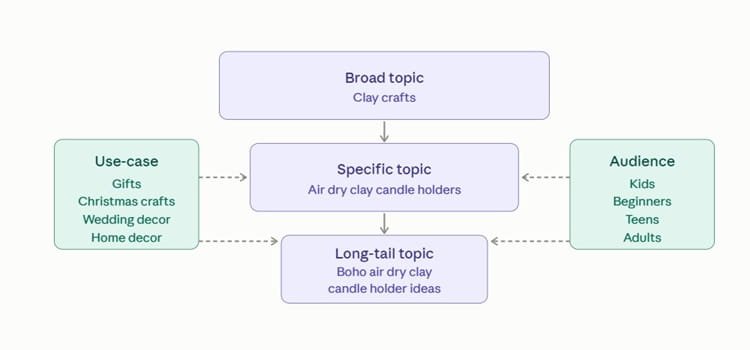
- Broad topics: Clay crafts.
- Specific topics: Air dry clay candle holders.
- Long-tail topics: Boho air dry clay candle holder ideas.
- Use-case variations: Clay gifts, Christmas crafts, wedding decor, and home decor.
- Audience variations: Clay crafts for kids, beginners, teens, or adults.
These examples come from the clay craft content I’ve been experimenting with on ThePortableLaundry (my public case study site, visible on my Youtube channel too).
One thing I want to make it clear that I don’t create a separate blog post for every phrase I discover.
Two keywords might express almost the same intent, while another phrase might represent a completely different content opportunity so you need to examine them before making that decision.
You can do so by simply typing the keyphrase in the pinterest search bar and looking at the results, the blog posts the color layouts and so on.
To make the research process easier, try different keyword variations in the search bar and see if same pins are populating if yes then it means you should target all those keywords into one blog post (easily achievable through annotation extraction, more on that below).
Where the Pintrendo Keyword Tools Fit In
I use the Pinterest Keyword Tool to discover potential topics and the Pinterest Keyword Clusterer to organise related phrases.
So, if you are starting new, you would need a Pinterest keyword clustering tool and if you are already an established blog just focus on the keyword part.
The results give me somewhere to start but they don’t tell me what I must publish yet.
We still need to check each opportunity here:
- Does the phrase make sense?
- Is the search intent reasonably clear?
- Does Pinterest return relevant results?
- Can I create something useful around it?
- Does it fit my website?
- Is it a genuinely separate topic or just another wording of an existing one?
Now this may sound overwhelming but it isn’t since I am writing this process it looks like too much to do, but all the points above can be achieved within a minute.
For example, does the phrase make sense?
kids clay craft DIY
Keyword-stuffed. Nobody types or reads it this way.
DIY Kids Clay Craft Project
Reads naturally, the way a real person would search.
If a phrase says “kids clay craft DIY” you should not write or use this exact phrase, use it properly just like a human would search… example “DIY Kids Clay Craft Project”
Likewise, for intent, the search results itself will scream what Pinterest wants.
I don’t want a website full of articles that target slightly different versions of the same search.
The objective is to find useful opportunities, not to collect the biggest possible list of keywords.
If you want to go for deep dive about keyword research methods and techniques, I suggest you read my Pinterest Keyword Research Guide →
Stage 2 Of The Pintrendo Method: Search
Once you’ve found a keyword,the next step is to take it to Pinterest.
This is an important step because a keyword tool can suggest a phrase, but I still need to see what Pinterest is showing for it.
Here’s a real case study of a Pin I used on my website theportablelaundry.
Case Study Of Finding a Cornstarch Clay Content Opportunity
I was exploring the topic of cornstarch clay and wanted to investigate a more specific angle: “cornstarch clay projects for gifting”.
Now don’t ask me how I got this keyword, I use Pintrendo for this too… more on that below.
But before, here’s how this topic idea populated.
I was posting quite a few clay craft content on Pinterest due to which my home feed had clay all over the place.
Thats where, I saw clay gifts being shown during easter, it was more of a general idea to see if people actually searched for cornstarch clay gifts anywhere.
But unfortunately I was unable to find anything.
I checked Pinterest’s search suggestions and Pinterest Trends but I couldn’t find clear evidence that answered my question about this particular angle.
In normal circumstances anyone could have dropped the idea or moved on to a broader keyword.
But here’s what helped me unlock the reach for a keyword that did not show any demand, and here are the steps I followed.
Step 1: Check Pinterest Search and Trends
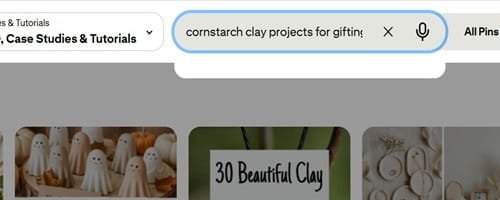
This was what Pinterest’s autocomplete showed (as I said earlier) when I checked the seed keyword, notice Pinterest autosuggest stops and did not give me any suggestions..
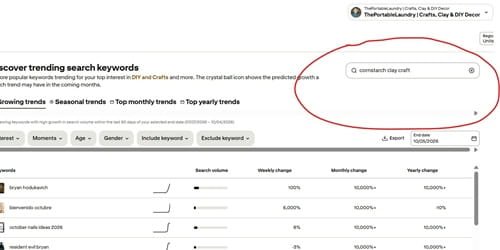
I also checked Pinterest Trends as well and neither check gave me a clear answer about the specific gifting angle I wanted to explore.
That didn’t prove there was no demand, it simply meant I hadn’t found enough information to make a decision yet.
Step 2: Explore Related Keywords With Pintrendo
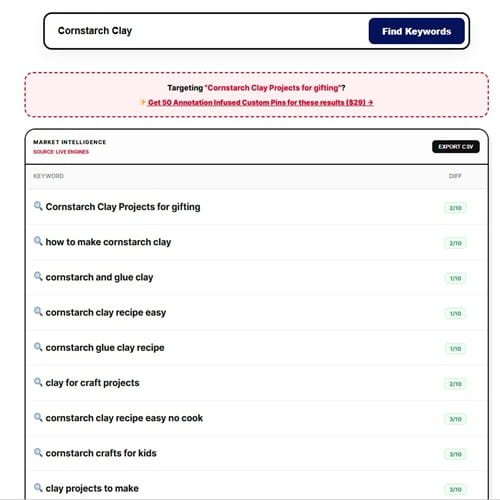
I went to Pintrendo and entered “cornstarch clay”. Among the related phrases it returned were as below:
This gave me several directions to investigate, notice “Cornstarch clay projects for gifting” shows up below:
I precisely needed this query because I was looking for gifting angle, perhaps its a luck it showed this query.
However, the important part here is the process.
Had I not found this query, I would have search for “Cornstarch Clay Crafts For Gifting” in Pintrendo.
Here are the results for that too:
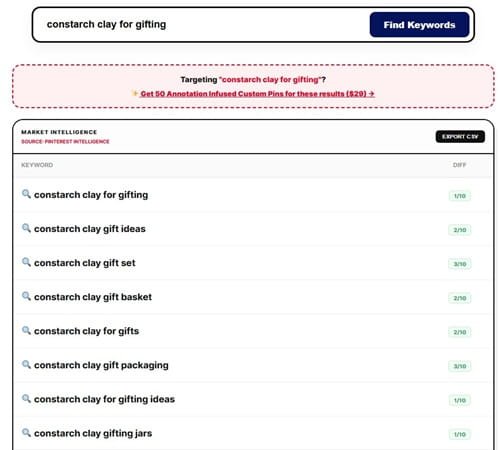
There are tons of ideas, which means endless opportunities here.
Anyways coming back to the case study, those were keyword opportunities surfaced by Pintrendo.
Their appearance in the results did not establish their search volume or guarantee that Pinterest would send traffic to content targeting them.
I still needed to decide which phrase was worth developing and test the idea through actual publication.
Step 3: Turn the Research Into an Article
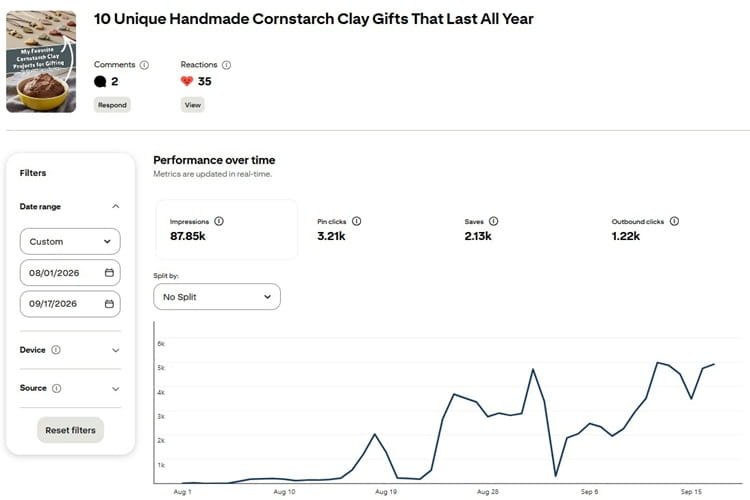
In this case I chose to write about “Cornstarch clay gifts” and created an article around it, here’s a screenshot below and that blog post is still active btw..
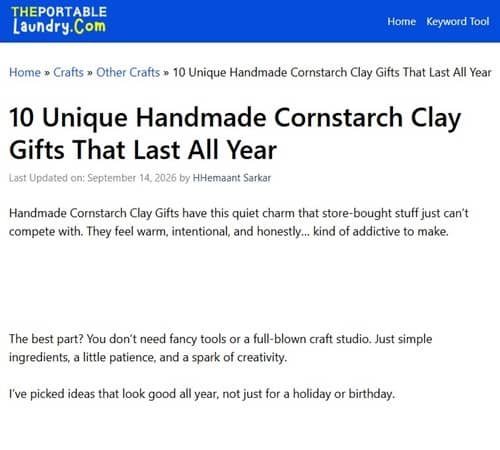
For me, this is the point of keyword research. I don’t want to finish with a spreadsheet full of phrases and nothing useful to show for it.
Also, while writing you should also try to keep the blog post, its supporting content, and its Pinterest assets aligned.
The topic shouldn’t change completely between the initial keyword and the final pin.
Step 4: Publish a Pin and Observe the Results
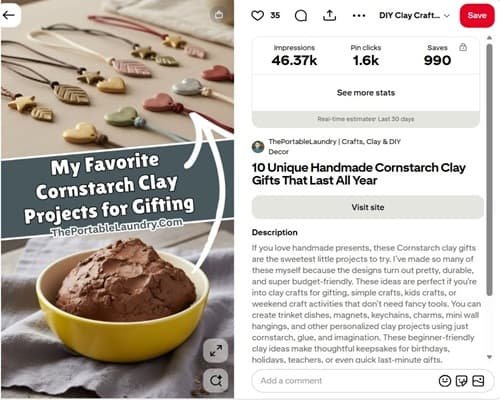
The next step is my favorite and that is to create a pin to promote the article.
So I created one and that pin went on to receive more than 46,000 impressions.
I no longer have the original publication date, so I can’t reliably tell you how long it took to reach that number.
I also can’t attribute those impressions to one particular keyword or annotation. Impressions alone don’t tell me exactly why Pinterest distributed the pin (at this point tracking these metrics is a challenge with so many things going on..but we evolve).
What I can document is the sequence of events: I researched the topic, explored related phrases with Pintrendo, created an article, published a pin, and observed its performance.
That is a useful experiment to learn from, even though it doesn’t establish that one particular keyword caused the result.
What I Learned From This Experiment
One of the major learnings for me is that you must not automatically dismiss a keyword just because it doesn’t appear in autocomplete.
Pinterest suggestions, Trends, and keyword tools can reveal different information and none of them gives me a complete picture on its own.
Another thing that I also noticed was that the pin’s potential relevance is definitely not limited to the original phrase. The broader subject connected with ideas such as:
- Cornstarch clay ideas
- Cornstarch clay crafts
- Clay crafts
- DIY clay crafts
- Clay gifts
are related topic areas I would investigate when studying the content and its performance.
This is one reason I like looking at groups of related keywords instead of treating every phrase as an isolated opportunity. A single blog post may be relevant to several closely connected searches which is clearly evident with my tests (not only this specific one but pretty much across all my tests).
My 2 cents, when you research a topic, try to know and understand what else belongs around it. That gives a much better starting point for planning the article, the pin variations, and any supporting content you might publish later.
Search Results Are Research Data
Pinterest search results are worth studying because they show what the platform is currently presenting for a particular query.
I don’t assume the first result is the best article, nor do I expect the same results to remain unchanged.
I look across the results to understand the types of content Pinterest considers relevant to the search.
It’s one more source of information to use when deciding what to create.
Important: Client sites are kept private, so the public example I can show in detail is that of my own. Treat the 26+ figure as context for how widely I’ve used the workflow, not as independently checkable proof. However, I can and will share the experiences, learning, methods, what’s working and what not based on the datasets that I have (I think that’s more important).
Stage 3 Of The Pintrendo Method: Study
At this stage, you go much deeper where you analyze the content behind the Pin and how it relates to the search you perform.
So, the idea here is to go to each webpage that those pins are linking to.
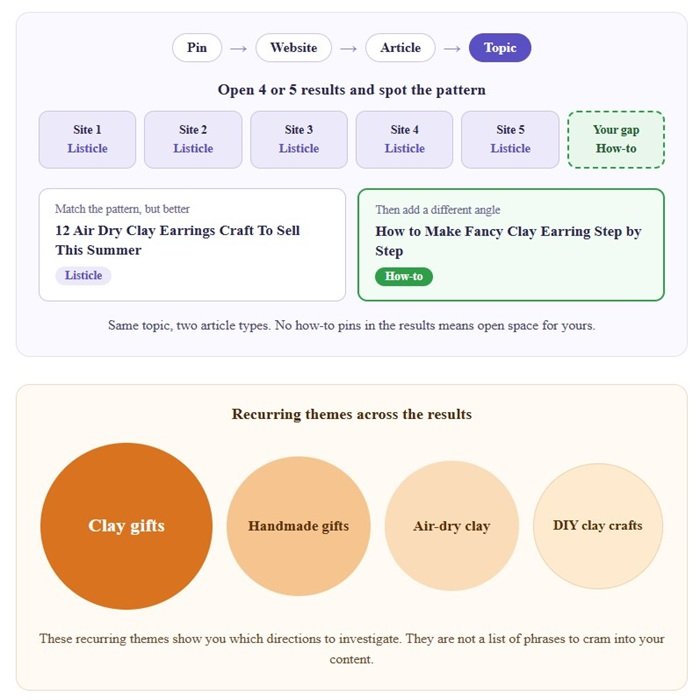
You dont need to do this for all the results, just check 4 or 5 sites, to know the pattern of the blog post/article.
Pin → Website → Article → Topic
Now here’s the real trick. If all 5 are listicles, you must try to match that but with a better angle, better images and better posts and if possible write one more how to type article targeting the same topic but with different angle.
Reason, being if there is no how to type pins, you still have an opportunity there.
And in Pinterest you need to be super detailed, just create one from a different angle and post a few pins along with the listicles which you wrote.
Here’s an example:
- 12 Air Dry Clay Earrings Craft To Sell This Summer
- How to Make Fancy Clay Earring Step by step
Get the idea?? That’s how you force pinterest algo.
I recommend examining several relevant results rather than just relying on one pin.
If multiple pins cover clay gifts, handmade gifts, air-dry clay, and DIY clay crafts, those recurring themes actually give useful directions to investigate.
That doesn’t mean you should automatically include every phrase in your content.
What Makes a Pin Useful for Research?
When researching always look for pins that meet as many of these below listed conditions as possible:
- The pin should be genuinely relevant to the search.
- The underlying topic must be clear.
- The destination page must always be checked for the type of content written.
- The pin should offer something useful to learn about the topic.
Let me drop one more gold here: Check the domain authority of the domain behind the pin, if its low and the content depth is shallow, go for it.
A visually attractive pin isn’t necessarily a good research example. You must understand the subject, not just the design and that’s a very important part.
Also, you must pay attention to how long a pin has been around.
A fresh pin can be useful for visual research, but an older pin may offer more historical information to examine.
When you start doing your own research by following the exact framework I am showing you here you’ll see that some fresh pins provide less useful annotation data than older ones.
So, don’t be surprised if you do a keyword research and don’t find any annotations, it’s likely due to the pin being fresh, OR Pinterest has not assigned any annotations to them yet.
Also, Pinterest doesn’t publish an official rule saying that annotations become available after a particular number of days.
Stage 4 Of The Pintrendo Method: Extract
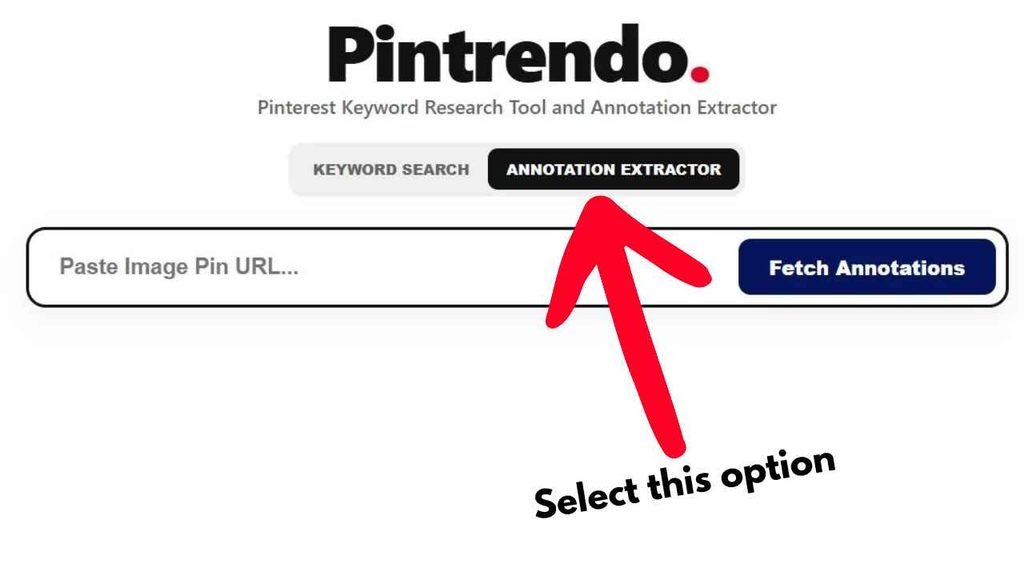
This is one of the parts of my workflow that led me to develop the Pinterest Annotation Extractor.
The process to extract the annotations is fairly straightforward.
Just copy the top performing pin URL into the Pinterest annotation tool and fetch annotations.
When annotation information is available in the publicly accessible pin-page data it can read, the Pintrendo tool extracts the associated phrases.
This gives me another layer of information to examine.
Instead of looking only at the title and description written by the creator, I can investigate phrases associated with the pin in the available data.
What Are Pinterest Annotations?
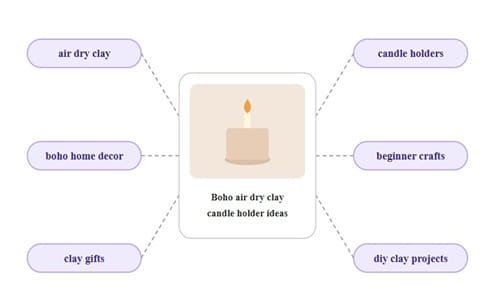
Pinterest annotations are associated keywords or phrases that can provide clues about the subjects and concepts connected with a pin.
I have been lately checking about the Pinterest annotation in Pinterest official documentation and unfortunately, I have not been able to find any concrete stuff on this and Pinterest also does not publicly document every detail of how these annotations are generated, established or even used.
However, all my test sites and client sites have experienced much faster growth when annotations are used.
That correlation tells me something is working.
And since I also do 1:1 calls, my clients have come back and confirmed that they started experiencing an upward trajectory when they followed the annotated interest inclusion.
Read More: What Are Pinterest Annotations And How to Use it
Stage 5 Of The Pintrendo Method: Create
By the time you reach stage 5, you will realize that you now have a better understanding of the topic, the search results, and the related phrases worth considering.
Which also means, it’s time to create the content.
Here’s my straightforward rule and this stands true all the time… “Research should guide the content, not replace it.”
I don’t want an article that reads like a collection of Pinterest keywords and no one likes that. Pinterest users will comment as well.. Don’t do that.
Instead, produce something useful for the person who arrives on the page.
Let’s return to the cornstarch clay gifting example.
If you are writing an article about 15 Cornstarch clay gift ideas for moms (which I already wrote btw) you could start with the main subject and then decide which supporting ideas deserve their own sections, for example: Cornstarch clay earrings, clay bracelets and so on… can become individual sections and diy clay craft projects phrase can go into the intro.
Here’s the article that I wrote already:
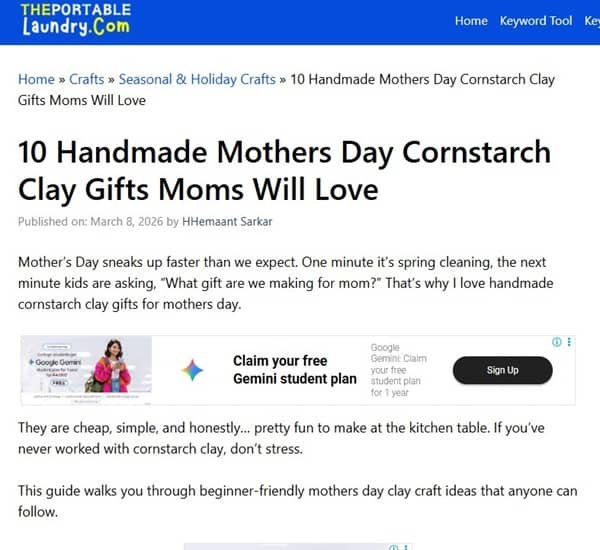
So, some phrases fits naturally into the introduction while others can be useful for headings or Pinterest descriptions and so on… you get the point now right?
Stage 6 Of the Pintrendo Method: Create Multiple Pin Versions
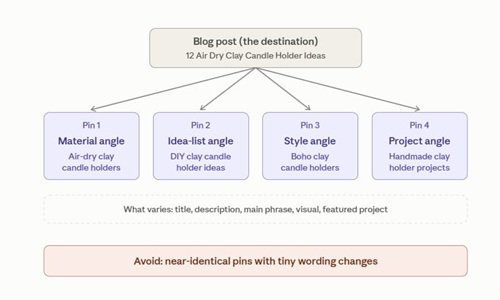
Once the article is ready, I usually create four or five pin versions, depending on the project.
This isn’t a Pinterest requirement. It’s the approach I’ve found useful in my own experiments.
I don’t want five copies of the same pin with tiny wording changes (dont do this its a sureshot way to get shadow-banned… I have faced this issue way back before covid).
I want each version to present a meaningful reason for someone to discover the article.
For example, if I publish an article titled “12 Air Dry Clay Candle Holder Ideas” (which I did in my test site), I create versions focused on:
- Air-dry clay candle holders.
- DIY clay candle holder ideas.
- Boho clay candle holders.
- Handmade clay candle holder projects.
The exact angles depend on what the article actually contains.
I won’t use a boho angle if the article has nothing to do with boho decor.
If that’s the case, I simply change the title, description, main phrase, visual composition, or the particular project featured in the image.
The article remains the destination, but the way I introduce it to Pinterest users changes.
That being said, you should avoid creating multiple versions simply to flood the platform. Each asset should have a clear purpose and accurately represent the destination.
Learn: How to Create Three or Four Pin Versions From One Blog Post →
I’ve also written a detailed guide on creating multiple pins for the same blog post safely.
Stage 7 Of the The Pintrendo Method: Cluster
Just like keyword research and annotation extraction is important, keyword clustering too cannot be ignored.
And here’s why…
If you have a board that talks about a clay recipe and its type and if you write a post about a chicken grilled recipe and post it in that board, good luck to you.
Even if you infuse the annotations and match the color themes, it wont work.
Hence, you must always work in clusters, use our Pinterest Keyword Clustering tool to cluster the content.
Make Pinterest’s bot job easier and the bot will ensure that you don’t leave unhappy.
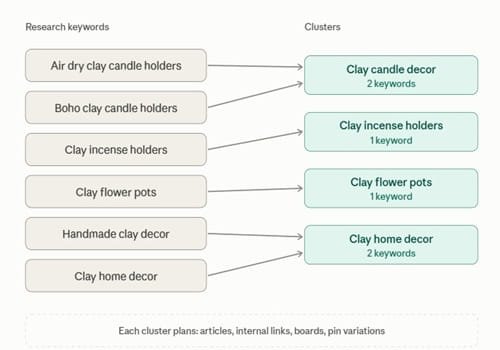
Likewise, suppose my research includes air dry clay candle holders, boho clay candle holders, clay incense holders, clay flower pots, handmade clay decor, and clay home decor.
I would not automatically put all these subjects into one enormous article, in Pinterest this strategy does not work as users are looking for inspirations.
So what I like to do is check whether they belong to separate groups:
- Clay candle decor.
- Clay incense holders.
- Clay flower pots.
- Clay home decor.
These groups can help you plan articles, internal links, Pinterest boards, and future pin variations.
I also want to be clear about something I’ve seen in practice i.e. a well-organised Pinterest profile can sometimes gain visibility for content that is not as detailed as a traditional step-by-step guide.
The thing with clustering is that it helps each page to serve a purpose and clustering cannot be ignored if you are thinking of a long term solution.
Take clay crafts as an example.
That broad subject can branch into air dry clay crafts, clay gifts, clay home decor, candle holders, incense holders, flower pots, crafts for kids, and seasonal clay projects.
And each branch may contain several more specific topics.
You don’t need to publish every possible variation.
The key is to identify the groups that make sense for your website and decide which ones you can cover well.
Stage 8 Of the Pintrendo Method: Review
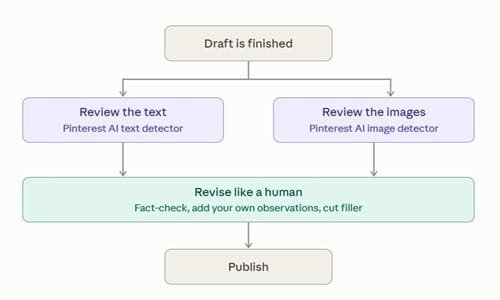
Now that you have done the hard work, don’t ruin it, the next step is to review.
Before hitting that publish, it does not cost you anything to review your work but if you don’t then it will cost you in the long run (in both Google as well as Pinterest), you must always review both the written content and the images.
Quick sanity check: run your copy through our Pinterest AI Text Detector and verify your images with Pinterest AI Image Detector before moving to the next step.
That being said, these are not Pinterest penalty detectors, use it to know where your content stands.
Why The Need To Review Text for AI Patterns
AI writing tools can be helpful for research, outlining, and getting work done faster.
The problem, in my view, is that when everyone starts publishing similar material with little original input what happens then? It forces platforms like Google or Pinterest to adapt and adaptation in the world of SEO means algorithmic change.
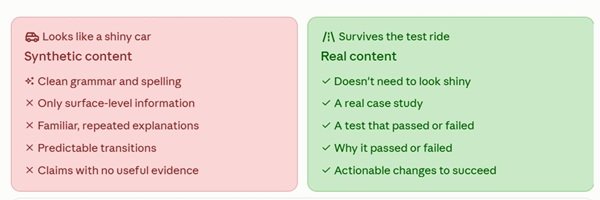
AI content can look nice in terms of grammar and spelling, meaning on the surface it looks like a shiny car.
The problem happens when we take the test ride, in other words, the information is only surface level and it was pretending to be awesome.
Real content does not need to look shiny, also it does not need to pretend. Also, it cannot tell or it cannot run experiments and tests like I am doing in this case.
Synthetic content leaves a clear train and often repeats familiar explanations, uses predictable transitions, and also make claims without providing useful evidence.
In my case, no synthetic content generators can generate a case study, do the test, fail/pass and provide actionable steps as to why the test failed or passed and what needs to be changed to succeed.
So, if I have used AI to help with an outline or an early draft I make sure to check the facts, add my own observations, remove unnecessary material, and make sure the final version says what I genuinely mean.
Why The Need To Review Images for AI Patterns
The same principle applies to images as well.
Of course the images look beautiful and its nice for social media too but when we talk about SEO or Visual optimization, then all these criterias are checked.
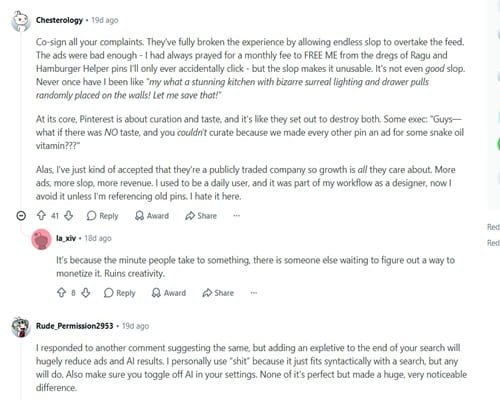
For example, if you write nice content, people in Reddit will copy it and run through AI detectors and if they detect any clues of synthetic content, be ready to get roasted.
Remember, this is a review step, not a claim that Pinterest will automatically suppress an image because it was generated with AI.
Pinterest’s policies and product features can change and being original is the only way to future proof yourself because when something gets abused new algorithms and new policies come into play.
Let me ask you this… have you noticed when you upload a pin you get this Mark As AI Modified option?
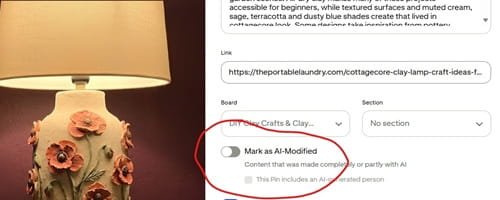
Think about it, why this happened? Why does Pinterest need this filtering?
Of course the users want the control to be able to view AI Modified content or not.
And let me ask you this… do you see any platforms saying Mark As Human Created? Even if you see it you instantly realize that the marking is again for segregating the AI VS Human content.
Detection Results Need Human Judgment
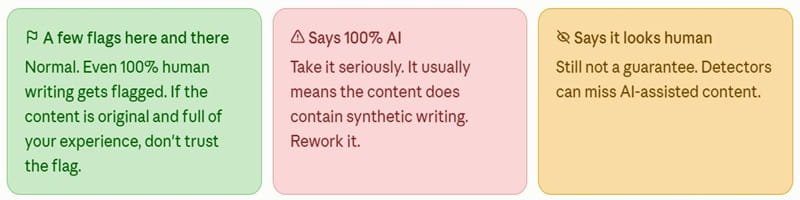
No detector can guarantee perfect accuracy across different models, writing styles, editing methods, or image-processing workflows.
A detector may flag original human writing, it happens to me all the time.
This Pintrendo website is 100% human written stuff but still from time to time when we see if the AI detectors are wrongly detecting it, we ensure we make the changes (for our peace of mind) as we don’t want to get wrongly caught in any algorithm.
You will see few flags here and there and that’s OK because as long as the content is original, full of your experience those AI detectors are not to be believed.
However, you cannot say the detectors are saying 100 percent AI content but your content is original.
I also run an AI detector tool and I know when it says 100 percent AI. it means your content does have synthetic content.
Synthetic content detectors may also fail to identify AI-assisted content. I therefore treat the output as an estimate rather than proof of how something was created.
If you are doing a final review, it must cover a few practical questions before you publish your blog post:
- Does the blog post sound like me as if I wrote it?
- Have I included my own experience where it is relevant?
- Does the pin accurately represent the article?
- Is the image distinctive and appropriate for the subject?
- Can we support the claims made?
- Have I used the related phrases naturally?
- Is there anything repetitive, generic, or unnecessary that I should change?
If the answer is satisfactorily yes, you are good to publish it.
Stage 9 Of The Pintrendo Method: Publish and Measure
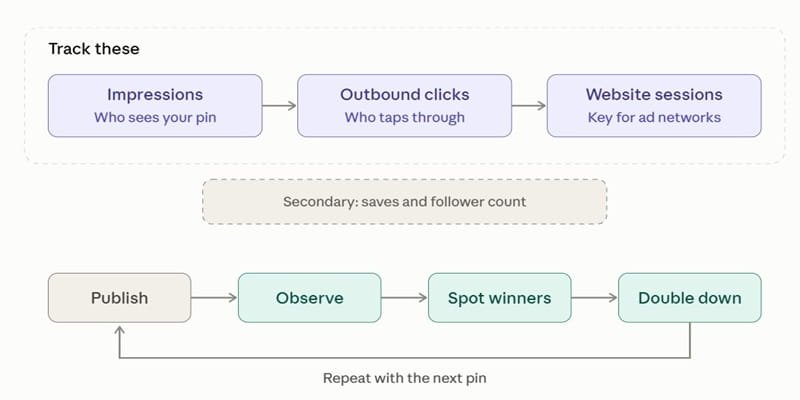
People usually think I am done publishing content so it means the workflow is completed.
Actually it is the point at which you should start observing what happens with pin you published.
You should track these:
- Pinterest impressions
- Outbound clicks
- And Website sessions (especially if you are looking to get approved in any ad networks)
The other metrics like save and follower count can be secondary.
The idea here is to find what works for you and then double down on those.
Because, if you don’t then how will you measure success?
Remember, you should not expect every pin to behave the same way. Some may take off and some may not work at all.
In some cases it may take 6 months, it happens all the time.
Why You Should Not Judge a Pin Too Quickly
Pins behave differently over time as seen in tests.
Some show early activity and then slow down whereas others take longer to gain visibility.
I have also observed meaningful changes over periods of roughly 30 to 45 days and beyond in some projects.
Those observations are a reason to review trends over time, not a guarantee that every pin needs the same amount of time to perform.
I look at the data available to me and decide whether I have enough information to draw a useful conclusion.
Use the Results to Improve the Next Experiment
My workflow doesn’t end at publication.
It continues like this on a repeat mode:
When a pin performs well, I make sure to have a deep dive of what might have contributed to the result and then simply double down on what’s been working for me.
When I say I analyze what contributed to good performance I mean I check if the topic was a better fit for the audience? Was the visual more appealing? Did the title communicate the idea more clearly? Did the article meet the search intent? Was the topic less competitive than other subjects I had tested? And other stuff like what board it was pinned to…
And just like others I am not able to isolate the answer always, but I can use the available information to develop a better next experiment.
The more you make mistakes, the more you will learn.
In fact, let me drop a piece of gold here.. I had a site called pressbuzzer.com and it got banned on Pinterest when I was testing pin frequency to figure out what the maximum Pinterest can tolerate.

The results were interesting…
So, this was a about ~2 months experiment where I posted Pins for 60 days and here’s what happened.
Baseline pinning volume before starting the project: 8 to 10 pins per day
Started Pinning: On 4th July 2020
Pinning Volume: 30 Pins per day
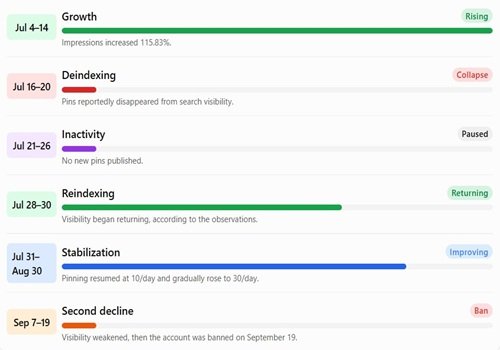
From 4th July To 14th July: Saw Exponential Increase In Impression count, we saw 115.83% increase in impression.
From 16th July to 20th July: The Pins were deindexed (So we stopped pinning here). Luckily the account was still active and domain was not banned either, so it looks like Pinterest simplyh shadow banned the account.
From 21st To 26th July: There was absolutely 0 activity, we did not pin anything, we just let the account cool. And we also did not email to Pinterest support. So, the account just stayed like that.
28th July: We observe the pins are slowly getting reindexed
29th July to 30th July: Our Pins started coming back.
From 31st July to 7th August: We started Pinning 10 pins a day again and noticed our account slowly becoming normal.
From 10th August: We started pinning 15, and then we moved to 20 and then 25 and then 30 again by the time we reached 30th August.
Cut to 7th September: We started observing the shadow ban again. And this time we did not allow it cool assuming Pinterest may have some glitch.
On 19th September: Our account gets banned
Looking back at this experiment, I believe increasing my pinning volume initially helped me gain more impressions. But I think there was another side to this growth.
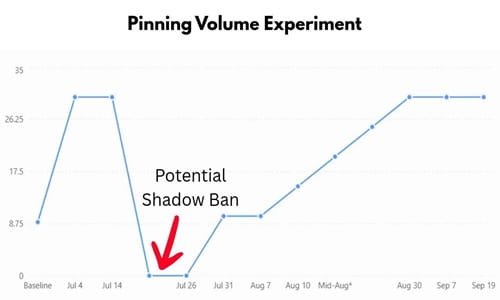
My interpretation is that, after a period of increased publishing, Pinterest’s spam filters may have flagged my account or content.
My pins started disappearing from search, and I suspected they had been deindexed.
So, observing this behaviour we stopped pinning for six days. After that, I began seeing my pins return.
I cannot prove that taking a break was the reason, but the timing was difficult to ignore… In fact, on the 4th day itself the pins started coming back and after 6 days we realized the pins were coming back.
Once the account started recovering, I began publishing again at a lower volume. I gradually increased the number of pins until I reached 30 a day. Then, in September, I noticed the same kind of visibility decline.
This time, I continued pinning because I assumed Pinterest was experiencing a glitch. On September 19, my account was banned.
I cannot say with certainty that the spam filters caused both visibility declines or that continuing to pin caused the final ban.
Pinterest never gave me access to the internal signals behind these events. However, to confirm this behavior I tested my another test blog amwaynutrilitedaily (which no longer exists) and the same behaviour was observed.
I will put a detailed case study about this pattern behavior separately… otherwise this blog post will become massive (it’s massive already).
But the pattern I observed made me take publishing volume much more seriously.
We do not have daily impression counts or exact indexed-pin counts. So, instead of inventing numbers, this timeline plots the reported visibility state across the experiment (screenshot below):
My recommendation
Establish your pinning baseline.
Start by pinning 4 or 5 pins per day and gradually way your work up.
Pinterest analytics will tell you when your graph begins to flatten. If that happens slightly increase the volume and see.
If your graph does not move up even after increasing the pinning frequency, do not force things. That’s your baseline.
To increase your traffic, you must find new angles new boards and approach little differently.
The Role of Originality
Optimisation and copying are two different things.
You should study a successful pin, investigate its topic, examine related phrases, and learn from its visual approach without reproducing the original work.
The final content still needs to offer something of its own.
Synthetic content writers have made it easier to produce content quickly.
That can be useful, but producing more pages and pins doesn’t automatically make a website more valuable.
I want research to help me understand what already exists.
Then look for ways to contribute something useful, whether that means explaining a subject more clearly, covering an overlooked use case, adding a practical example, or creating a more relevant visual.
Originality doesn’t mean ignoring keywords or refusing to study competing content.
It means using that research to make better decisions instead of copying what has already been published.
Pintrendo Tools Used in the Method
5 tools, 5 specific jobs. Supports a particular part of my workflow.
- Pinterest Keyword Tool: Most marketers target dead ends. We built this to dig up quiet, untapped niches On Pinterest that actually generate traffic.
- Dump your search phrases into the Pinterest Keyword Clusterer. Watch it map theme relationships automatically – no spreadsheets required.
- Pinterest Annotation Extractor: If you really want to know what Pinterest’s algorithm sees when it parses a pin, run the Pinterest Annotation Extractor to pull out those raw, underlying contextual tags hidden deep within the code.
- Pinterest AI Text Detector: Important for content review to flag writing patterns that may warrant a closer look.
- AI Image Detector & Image Forensics: With Fake images everywhere now. Use our AI Image Detector to analyze raw metadata, scan pixel footprints, and verify if an asset was actually synthetically generated.

About Me!
I am Hemant and I have been building websites since 2011 and working seriously with Pinterest since 2015. After years of algorithm hits, Pinterest penalties, failed experiments and successful case studies, I built Pintrendo around the systems I use to research, test and manage Pinterest accounts for my clients. Today, I work with global client accounts and build tools based on hands-on testing, not recycled Pinterest advice. Read More…