Pins rank for keywords missing from their title or description because modern search engines do not rely on lexical matching (exact word string matching), they rely on semantic entity extraction, topical vector alignment, and contextual co-occurrence.
Pins are nodes in a knowledge graph.
They will get ranked based on relevance to keywords and topicality by combining multiple layers of signals.
1. Semantic matching
Conventional keyword matching looks for a match between the keywords in the query and those in your document.
Modern search engines use a second layer of matching looking at numerical representations (embeddings). The closer the embeddings match, the better.
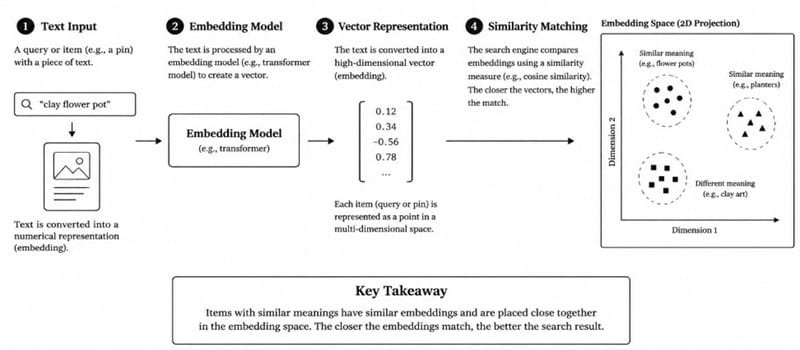
This means that items with similar meanings will be close together. Pinterest have published some information about this.
For example: SearchSage is a system that creates embeddings for search queries and matches them against pin embeddings.
However, we don’t have the full ranking algorithm information publicly available.
But certain correlations in our tests do point out that semantic matching gets a lot of respect.
Also, many other factors go into the final ranking such as recency, personalisation, language, quality and spam.
So we cannot know exactly how much weighting any individual signal has.
2. Signals that can help your pin rank without matching
A. Image recognition
Pinterest have computer vision models that can recognise objects, colours, textures and style from images.
So they can still recognise your image is related to a handbag even if your title and description are blank with a title of ‘Sunday Vibes’. Their visual search tool Lens also uses image recognition.
B. Boards
Pinterest have stated that they use the boards you save your pin too.
If you have a board full of Scandinavian kitchen ideas then it will know your pin relates to that topic.
Title, description and other pins on the board all provide context. Whilst we don’t know the precise method, the basic concept is well backed up.
C. Graph Embeddings (PinSage)
Pinterest released a graph neural network called PinSage in 2018 (Ying et al., KDD).
It creates embeddings by learning from the graph of pins and boards. Random walks are used to find relevant pins to focus on.
Each pin has visual and text features combined with information from these relevant pins.
Basically, your pin will be represented based on what pins you often save along with it.
This was primarily developed for recommendation purposes, however the embeddings and similar graph signals can be used in search.
D. Engagement
If you have high engagement with a particular pin by clicking, zooming in or saving it often when searching for a query, this will be a strong signal of relevance.
Over time, your pin will be more likely to show up for queries that don’t include your text. However, we don’t know how Pinterest store or weight this data.
E. Other users text
Other users will save your pin, putting it into boards with specific titles. They might also add notes.
This will provide extra description. Similar to anchor text on the web. Pinterest also have multiple sources for annotations (topic and keyword tags).
3. Issues with inference only
Whilst automatic understanding can be very useful, there are issues with relying completely on this.
Incorrect classification: If your pin doesn’t have much text, it can get classified incorrectly. For example, if you have a handmade leather journal it could be classifed as being related to other unrelated leather items. This could cause impressions for irrelevant searches and low click-through.
Slow start: Engagement signals won’t be built up quickly. New pins with little text will struggle. Having clear text will help to confirm the topic from the image and boards.
4. Tips
Look into what people are searching.
Pinterest themselves have search suggestions and keyword research tools to see what people are actually searching.
Use clear title and description. Describe what’s in your image using natural language and include key topics. Don’t stuff your keywords.
Use focussed boards. Use descriptive titles and save your pin to the most relevant board.
Have relevant image. Having clear and on-topic images will help the vision models classify your pin.
Be patient. Engagement signals will build up over time and results will vary.
Use Pintrendo to Discover Relevant Keywords
For example, by simply creating a pin on handmade leather journals, Pinterest would be able to recognize the picture as leather material and display it whenever users search for similar objects even though the necessary keywords are not present in your title.
But automated classification is a broad category that might be wrong sometimes.
It is better to focus on reaching the visitors looking for handcrafted journals.
That is why using the Pintrendo Pinterest Keyword Tool to check possible search terms and find the keywords that correspond to the actual content on the website makes so much sense.
And then you can incorporate the appropriate keywords into the title and description of the Pin.
Conclusion
Your pin can rank for keywords not mentioned in your title or description as Pinterest uses multiple sources of information.
The image, boards, pins saved with, engagement and text from other users will all be considered.
By keeping your image, boards and text focused on the same topic, you will give clear signals for the system.
This will increase your chances of ranking well, but there’s no guarantees.
And that’s the precise reason why Pinterest Keyword Research is an important aspect and will continue to be.
Sources: Pinterest engineering blog posts on PinSage and SearchSage. PinSage paper: Graph Convolutional Neural Networks for Web-Scale Recommender Systems (KDD 2018).
<< Back To Pinterest Keyword Research FAQs