Yes, Changing a Pin’s destination URL can affect its keyword ranking, because Pinterest uses the content of the linked page as a relevance signal. Even though the pin ID remains the same, as will engagement and saves, Pinterest will now take into account what the pin is about based on the new destination. If the new page is targeting the same keyword then it will usually be fine. However, if it’s targeting a different topic then there will be less relevance and the pin might drop in terms of its original keywords.
This answer belongs to the Pinterest Keyword Research FAQ, the hub for every keyword question in this series.
Why does Pinterest care about the destination?
Pinterest looks for consistency between what is being said in your pin, what the image contains and what the destination page contains. This makes it easy to categorise and makes sure it’s targeting the right search terms. If you change the destination then this will affect one of the three points and could cause inconsistency.
Pinterest doesn’t share their exact ranking formula but it’s best to think about this as just affecting the relevance of your pin.
What stays the same?
When you edit your current pin to change the destination, the following will remain the same:
- Pin ID
- Saves, reactions and comments.
- Board location, title and description.
What will change?
Topic relevance from page content.
Perceived quality and freshness of destination.
Whether the pin is delivering what it promises (which impacts engagement).
What are the risks of changing URL on Pinterest?
Changing the destination URL depends on what topic your new page is.
- Same topic, new URL: You have moved a post during a redesign. As long as your page is loading quickly and is targeting the same keyword there shouldn’t be much of a risk.
- Related topic, different angle: You’re targeting a “vegan meal prep guide.” page with a pin for ‘vegan dinner ideas’. There should only be an average risk here. Some keywords will still be relevant but others will start to drift.
- Different topic altogether: You’re targeting a décor pin to a store home page. This has a higher risk as there’s less consistency between what the pin is promising and what the page contains.
- Destination is broken/redirecting: If the page is broken it will give a bad experience signal. However, as long as you’ve set up a 301 redirect to a similar page it will be much safer.
How can I make this as safe as possible?
Always start with your website. If the page URL has changed then setting up a 301 redirect from the old URL to the new means your current pins will still work. If you do need to edit the destination of a pin then follow the below:
Make sure the new page is targeting the same main keyword.
Update the title and description of your pin if the new page is using better wording.
Change the destination and leave it for a few weeks to see how it affects it. Don’t make multiple changes.
Don’t make multiple changes. You won’t know what caused the change in rankings.
If the new page isn’t targeting the same keyword then don’t change your old pin. Create a new pin for the new page.
How Pintrendo Pinterest Keyword Tool can help?
Most ranking drops after changing the destination are due to one thing… nobody checked to see whether it was still targeting the right keyword.
Our Pinterest keyword tool will help you to ensure that your pin is targeting the correct phrase and variations.
This way you can be sure that the new page is using the right words that Pinterest users would search for.
Here’s how to get it done:
1. Open Pintrendo Pinterest keyword tool, switch to annotation extractor tab and then enter the Pin URL (Not your website URL) and then hit the fetch annotations
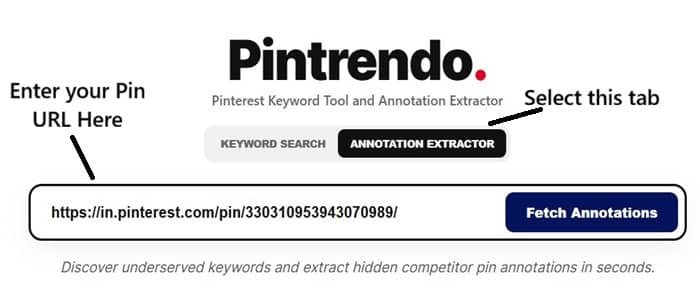
2. Pintrendo will fetch Pinterest annotations associated with your pin
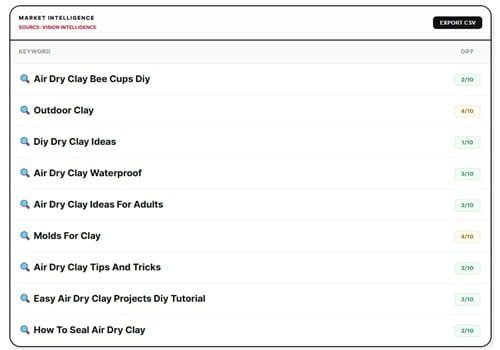
These are the keywords and keyphrases that Pinterest thinks closely relates to.
Note: I have also published a detailed guide on what Pinterest Annotations are in detail here. Be sure to check that out if you want a deeper understanding.
So, as long as you point your links to a page that describes these interests, Pinterest is likely to not de-rank your pins.
Read our full guide on Pinterest keyword research to create a consistent process for linking keywords to pages and pins. Check out our Pinterest Keyword Research FAQ for related answers.
Final Thoughts
A better way to think about this is that your pin destination is a key part of the keyword asset.
You already have a ranking pin which means you know that the phrase, image and page are all matching. Any changes to this will be a gamble.
Keep track of any changes you make in a simple log. Include the pin link, old URL, new URL, date and main keyword.
This way if you start seeing ranking changes it won’t seem like a mystery. You’ll be able to see trends and know what changes are helping and what are causing issues.
Ask yourself if you even need to make changes. Often it’s better to leave your current pin as it is and create a new pin.
This will have a different image and destination URL. This means you’re keeping your current ranking but giving yourself a new opportunity.
<< Back To Pinterest Keyword Research FAQs