Pinterest annotations are the keywords and phrases that Pinterest attaches to a pin to describe the content. They are formed from the image, title, description, board and page behind the pin. They define which searches, feeds and emails your pin can appear in.
You can see which annotations Pinterest has assigned to any pin using the annotation tab in the Pinterest Keyword Tool, which fits into the wider Pinterest keyword research process.
So, the difference between a keyword and annotation is that keyword is what you choose, and an annotation is what Pinterest chooses for you.
How does Pinterest tie an image to a phrase?
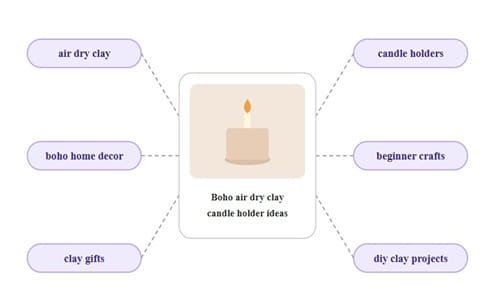
Pinterest notices the object in the image, and the colors, shapes and styles associated with it.
It reads the text on the graphic, your title and your description.
It then ties the pin to phrases for example clay candle holder, air dry clay and handmade gifts.
In fact in many cases you will notice that you didn’t even write the phrases, yet Pinterest assigns an annotation tag that may look completely different.
The reason this happens is because Pinterest is extremely smart to read the image and its meta data in detail and then it also tracks user interaction with pins (which is also a factor in determining annotations).
So, all those factors contribute to the annotation assignment.
Also, pins that look similar get grouped together.
Pins that talk about similar things get grouped together as well.
When the image, text and page are consistent with each other, Pinterest is confident about the pin.
When they are not consistent, Pinterest is confused, and those pins don’t get fair distribution.
Annotations, keywords, interests and hashtag
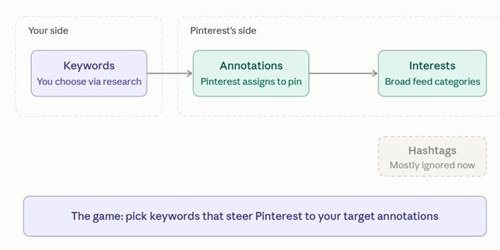
Here’s the diagram. Purple is what you control, and teal is what Pinterest controls. The faded hashtag box sits off to the side because it barely matters now.
People confuse these terms often.
A keyword is a phrase that you target based on research.
An annotation is a phrase that Pinterest chooses for the pin.
Interests are broad categories that Pinterest uses to determine feeds. Hashtags are practically useless at this point, so let’s not focus on them.
Your job is to select keywords that will steer Pinterest towards the annotations that you want. That is the game.
Do annotations override your description?
Not directly. Your description still helps. But Pinterest reads the image as well, so if the image says one thing and your words say another, the pin sends mixed signals.
Take a pin titled “Banana bread with chocolate chips”. The image is a blurry close-up and the text on it says “Weekend vibes”. Pinterest has nothing clear to hold on to.
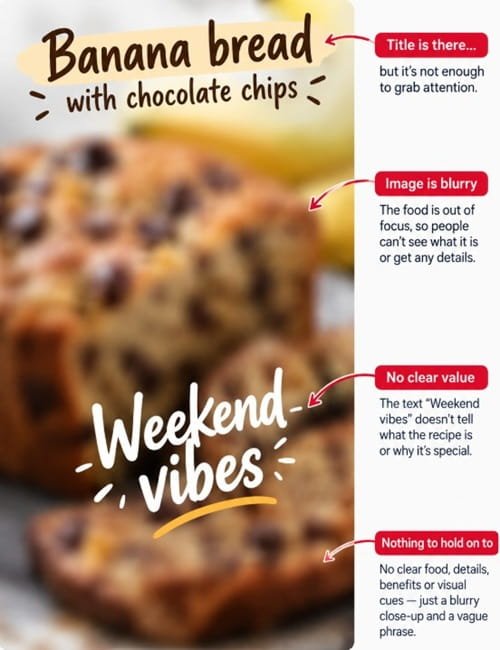
It may tag the pin with the wrong terms, or almost none, and the right people never see it.
My rule is simple. The image and the text on it make the claim.
The title and description back it up. They never argue with it. “Clay candle holder tutorial” beats “Cozy vibes” every time.
Why does that clash cost you so much? Because Pinterest isn’t just tagging the pin.
It’s deciding where the pin belongs.
And when the image and the words disagree, it can’t tell. That “where” is what many creators call a bucket.
What are buckets?
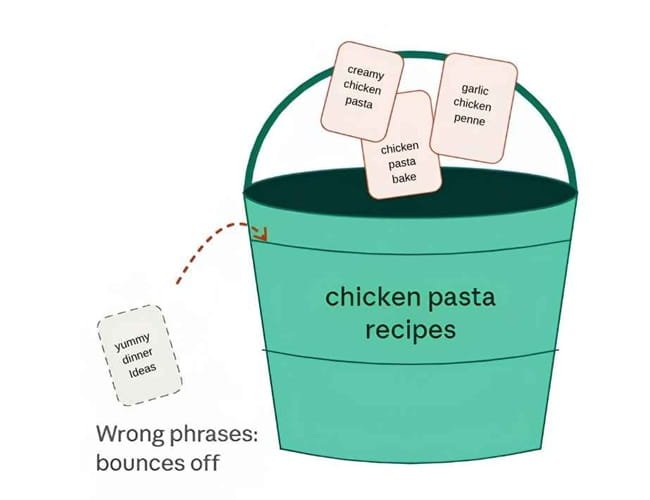
Think of buckets as smart folders. Pins on the same topic live together.
Some are old and clear, like “chicken pasta recipes” or “fall tablescapes”. Others are new and loose, and Pinterest is still working them out.
Pinterest doesn’t use the word bucket in public. It is just a handy way to think about it.
Your pin needs to land in the right folder. If your phrases don’t match one, or they confuse Pinterest, the pin gets less push.
How do new buckets form?
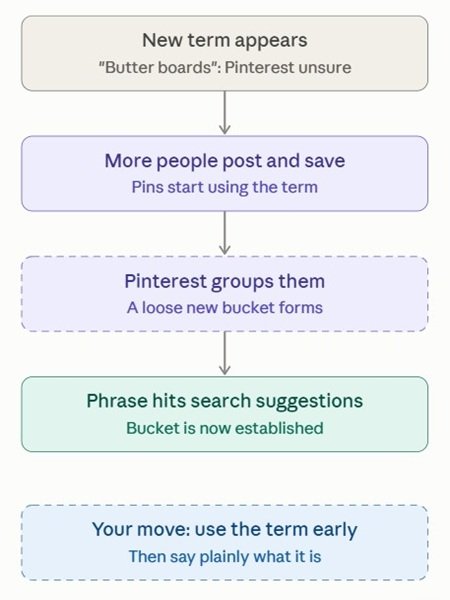
Pinterest learns from what people post and search.
Take a new food trend like butter boards.
At first Pinterest may not know the term.
Then more people post and save pins that use it, Pinterest starts grouping them, and later the phrase shows up in search suggestions.
That’s why early, clear wording helps. Use the new term, then say plainly what it is.
This also fits my timing notes below. Fresh topics need time to settle.
Style words are fine, buzzwords aren’t
I listed boho, rustic and cottagecore as style words further down.
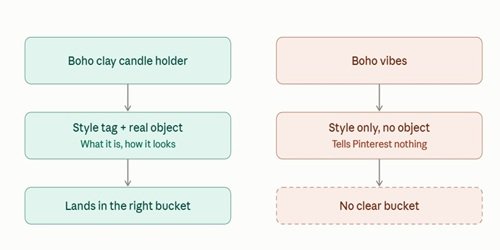
Some people say to skip words like “vibes” and “aesthetic”. Both sides are right. It depends on what the word is attached to.
“Boho clay candle holder” tells Pinterest what the thing is and how it looks. “Boho vibes” tells it nothing. Use style as a tag on a real object, never as the whole message.
Master the Fundamentals First: Annotations determine how Pinterest categorizes your pin, but keyword research determines what users are actively searching for. Read our complete Pinterest Keyword Research Guide to learn how to identify high-volume, low-competition keywords before extracting annotations.
Why do annotations matter for reach?
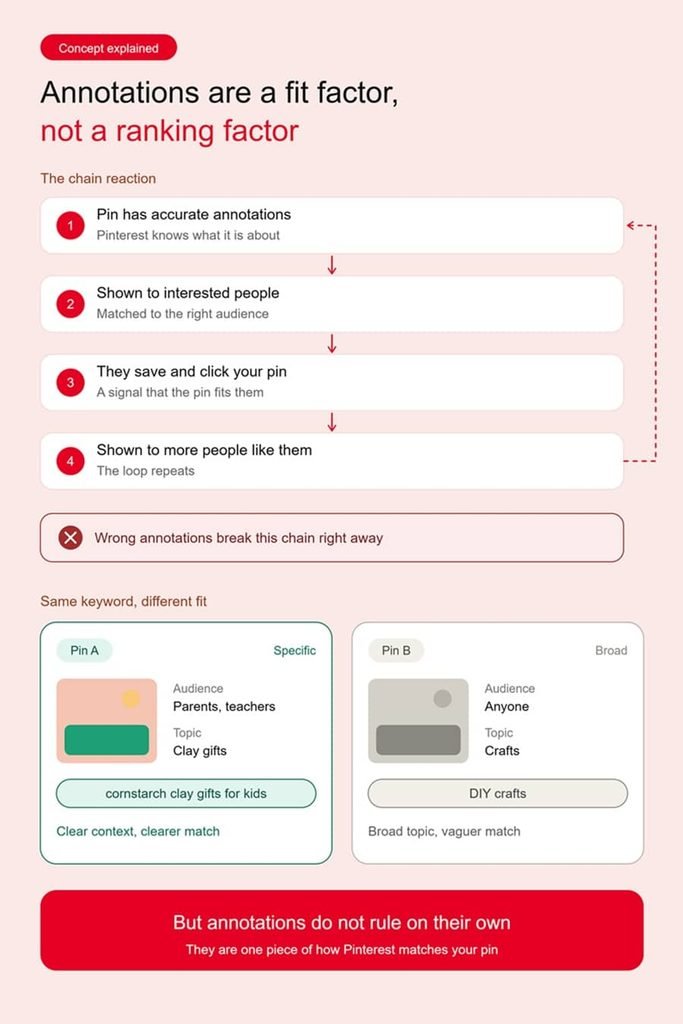
Annotations aren’t a ranking factor, they are a fit factor.
If Pinterest knows what your pin is about, it will show your pin to people who are interested in its content.
Those people will save and click your pin, signaling to Pinterest that it should be shown to more people like them.
Wrong annotations stop this chain of events right away.
Take two pins for example targeting the same keyword.
One includes related phrases like cornstarch clay gifts for kids, while the other relies on broader terms like DIY crafts.
The first gives Pinterest more specific context about the pin’s subject and audience, while the second covers a much broader topic. This can influence how Pinterest interprets and matches each pin to relevant searches.
But annotations do not rule on their own.
Boards matter, your account matters, fresh pins and saves matter. Annotations are just another piece of the puzzle.
In our test site here’s what we observed:
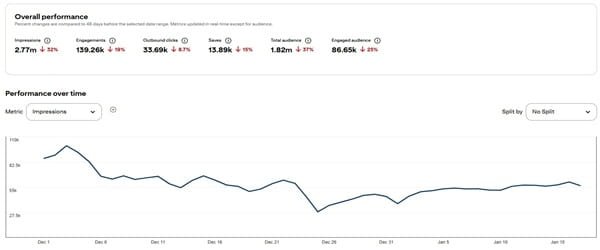
(The traffic looks flat on our experiment site)
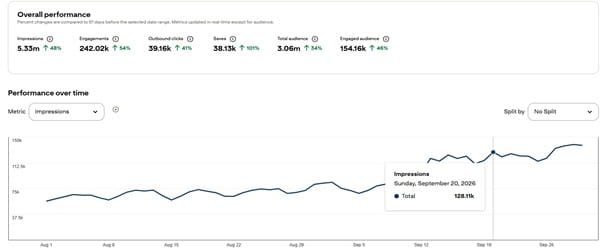
(The uptrend happens when you work in cluster – All pins pinned with annotations)
Be sure to check out the case study that the Pintrendo Method covers.
How does the reach actually happen?
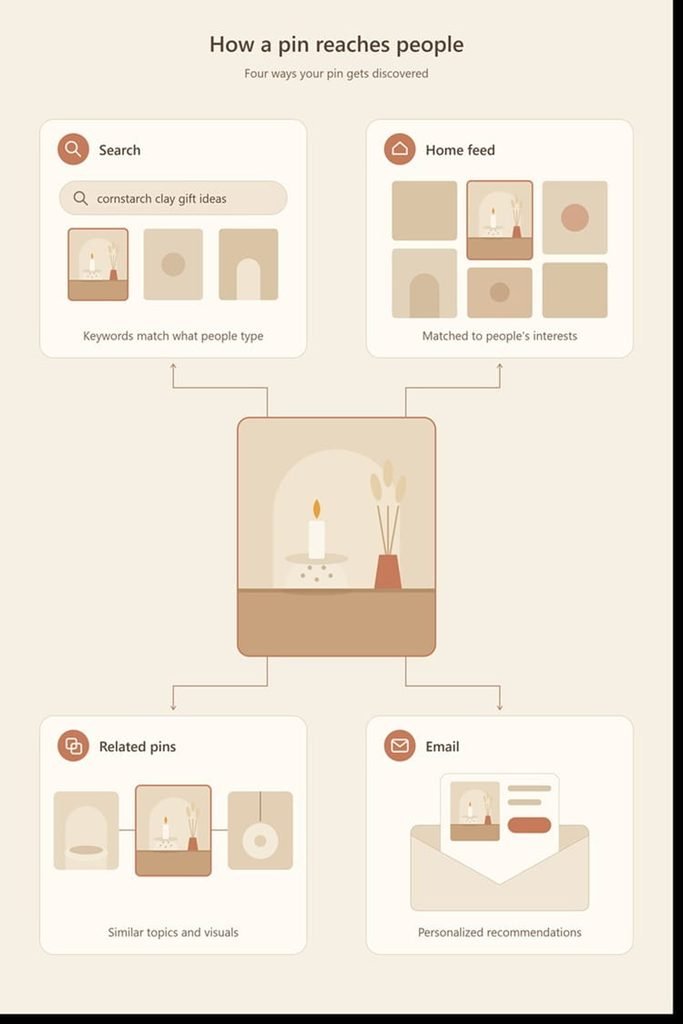
A pin can reach you from a number of paths. Annotations contribute to the success of a pin in different ways.
Search
When someone searches for cornstarch clay gift ideas, Pinterest will find all pins that fit this category, and rank them by quality and saves.
Annotations are one way of fitting a pin to a search, and a well-organized pin will appear higher in these searches.
This is the reason why a pin can appear in search results for a phrase that you have never researched.
Home feed
Searching aside, the main way of finding pins is through the home feed.
Here, Pinterest makes educated guesses of what a person might be interested in based on what they have saved and clicked on. Annotations help Pinterest fit your pin to the home feed.
A pin with the annotation of a clay candle holder can be found by someone who has been browsing boho decor.
Related pins
Open any pin, and look below it, under the word “Related”. These pins are chosen by Pinterest based on visuals and content.
Shared annotations are one way to pick related pins. That is also why a set of pins dedicated to the same topic are so powerful.
Pinterest also emails people pins that it thinks they might be interested in.
Clean, well-organized pins are more likely to be picked for this, and you can’t force it by any means other than Pinterest recognizing your content.
Does every annotation go in every pin?
No. And I see many people making this mistake.
Our Pinterest annotation extractor may give you 10+ annotations, but I would say do not stuff all of these phrases in every single place. I ask myself if they apply first, so you should do the same here.
In any case you will be creating 3 or 4 pins, which means you get 4 chances to include those phrases in a natural manner on the pin.
Another example would be let’s say I am writing about cornstarch clay gifts for children, most of these phrases are useful.
If I am writing about the best sealers for finished clay decor, the crowd is completely different.
The intent is different, and most of these phrases do not apply.
The topic of the piece determines the phrases, rather than the other way around.
I treat Pinterest titles and descriptions the same way. I am not trying to use every annotation in every pin.
I am trying to describe my content well and cover the right phrases along the way.
How I sort the phrases?
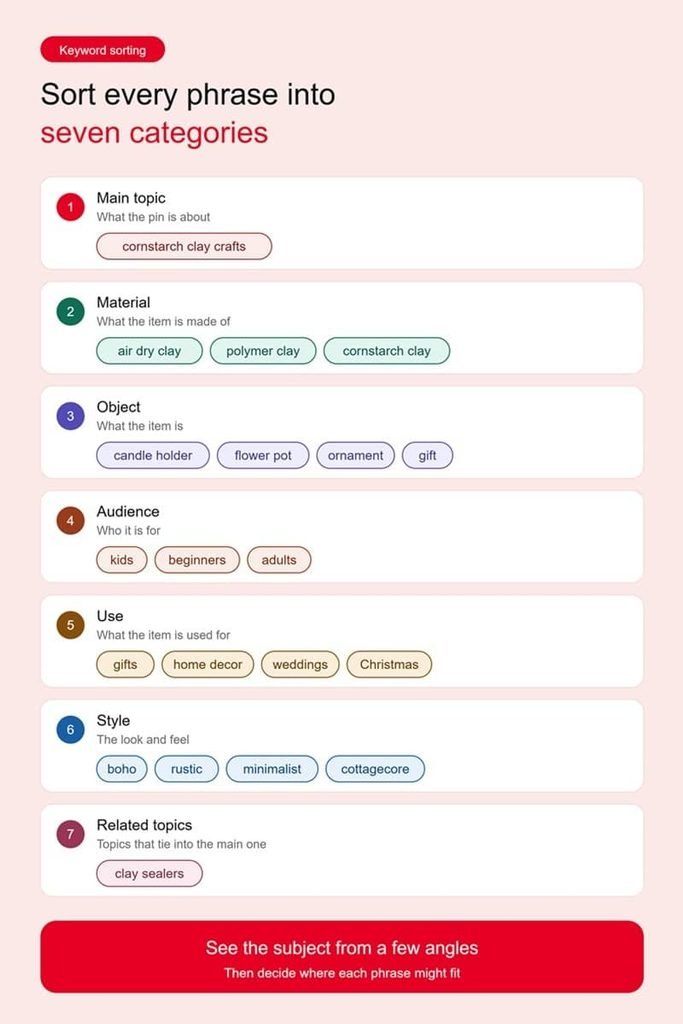
I sort them into categories. The main topic is what the pin is about. Material is what the item is made of.
This includes air dry clay, polymer clay, or cornstarch clay. The object is what the item is, such as a candle holder, flower pot, ornament or gift.
I then sort by audience, such as kids, beginners or adults. The use of the item defines it, such as gifts, home decor, weddings or Christmas.
The style is boho, rustic, minimalist or cottagecore. The last category is related topics that tie into the main one.
This sorting helps me see the subject from a few angles, and to determine where a phrase might fit.
Maybe it fits this article, maybe it fits a separate pin, or maybe it is saved for a future post.
When I pull a list, I do one quick pass. Every phrase gets a verdict.
Keep it if it fits this pin. Park it if it fits another pin or post. Drop it if the intent is off.
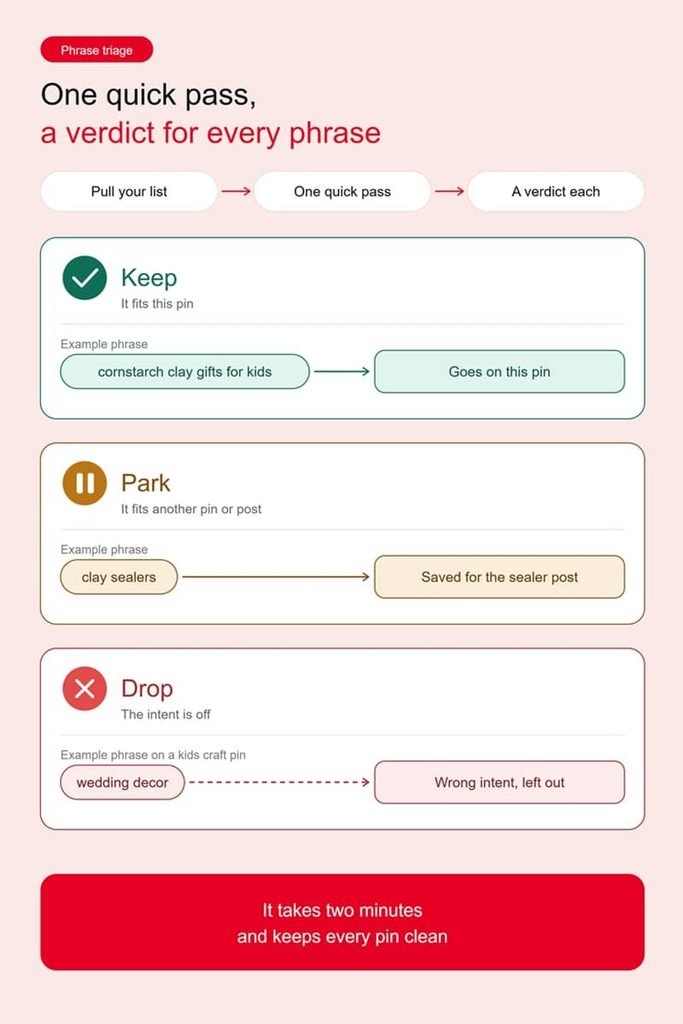
“Cornstarch clay gifts for kids” is a keep. “Clay sealers” gets parked for the sealer post. “Wedding decor” on a kids craft pin is a drop. It takes two minutes and keeps every pin clean.
One article, many doors
Earlier I said you’ll make 3 or 4 pins per article. Here is the real reason to do it. Annotations belong to the pin, not to the article.
So don’t make four copies of the same pin. Make four doors. One pin leans on the audience, say kids.
Another leans on the use, say Christmas gifts. A third leans on the style, say rustic.
Same post behind all of them, but each pin gets read a little differently and can reach people through a different path.
How do I find annotations?
Start with Pinterest search. Type out your topic, and look at the chips that appear. Open the top pins and see how they are worded.
Check your own stats to see which searches bring impressions.
Many phrases appear strange, some are completely unrelated, and some stand out as particularly useful.
Once you have zero-ed into your target keyword.
Go to the search box and type your target keyword and search it.
From the list of top pins, you need to copy the URL of top pin and then head over to Pintrendo Keyword Tool.
And then switch to the annotation tab and then paste the url there.
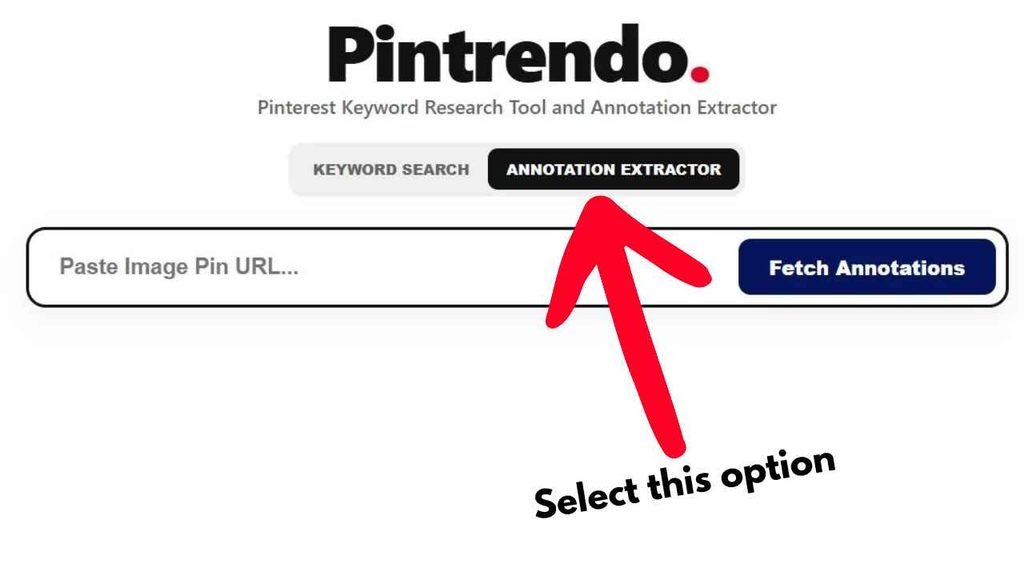
Next, hit the fetch annotation button.
Pintrendo, will fetch the relevant annotations assigned to the pin.
The related pins test (free)
Here’s a trick that costs nothing.
Open your pin and scroll down to the related pins.
Those show what Pinterest thinks looks and reads like your pin.
Now do the same with a top pin for your keyword and compare.
If your related pins match your topic, good. If they’re way off, Pinterest may be reading your pin wrong.
Say a clay candle holder pin sits among random home decor. Check the image, the text and the board.
Then search your target phrase and look at the top results.
Does your pin look like they do? Same kind of image, same kind of words? If not, you just found the gap.
When an odd phrase shows up
Sometimes the extractor throws up a phrase that makes no sense. Don’t chase it.
Treat it like a smoke alarm. It hints at how Pinterest may be reading the pin.
Say a clay ornament pin gets tagged with cookie terms. Maybe the photo looks like cookies.
Maybe the board is full of baking. Fix the signal, not the phrase.
Where do I use them?
Use those keywords, keyphrases and terms naturally in the article as well as PIn title, text overlay and descriptions.
That is where Pinterest looks. Write for people first, and a description that looks like a collection of tags is far from a good description.
Match the post to the pin as well. A pin promising clay gifts and leading to a page that does not follow through will have high bounce rates, and Pinterest will see that as well.
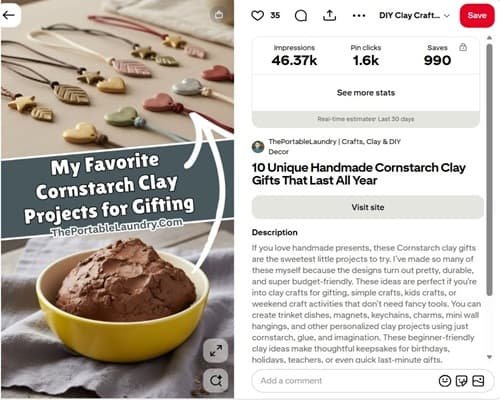
Here’s an example of a pin that contains all the factors discussed here:
Don’t repeat your main phrase ten times in a description.
It reads badly and looks spammy. Say it once or twice, then add one or two close cousins.
For “cornstarch clay gifts”, that might be “handmade gifts for kids” or “easy clay crafts”.
Same goes for new phrases. Mix in one or two fresh, long ones per pin, and keep them plain and tied to the content.
Why boards matter?
The first board you save a pin to matters too.
Pinterest reads board context, so make that first save a tight, on-topic board and not a random catch-all.
Remember, annotations do not work in a vacuum. A board filled with clay recipes has no business trying to rank for a chicken recipe.
That is absurd, and no one should be expecting it to work. Keep each board dedicated to one topic, have a clear name, and only save relevant pins.
My Personal Experience with Annotations…
It is a fun story, and one that I don’t think about often. My interest in this was sparked on my old site, Fatlossplanner, which I sold off later.
I was looking at Pinterest page data with code, and the raw data was not so interesting to look at.
Some phrases appeared strange, some were unrelated, some were surprisingly useful.
I made several hundred pins, did keyword research and pinned on Pinterest. I pulled annotations from selected pins, and tuned my content.
I made variations of my pins, and watched the numbers change.
Every time I implemented annotation phrases in the blog post, description and pin title, I saw the graph creep upwards.
This still happens today, and some pins have thousands of impressions, even if the graphic has different wording than my original keyword research.
I am not pretending to have scientific proof, but these were not lab conditions either… I spoke about a small case study at Pintrendo Method which I did with my test site.
I cannot separate annotations from the rest of what affects a pin’s performance, but this is an observation in my own practice.
One last thing: I lost my Pinterest account once, because the spam filter decided it was spam. It was recovered later, and I learned my lesson. Do not be spammy.
How long does it take?
I have tracked timing as well. In one project, things settled down after about 35 to 45 days.
In ThePortableLaundry it was around 29 to 35 days.
I have published a case study here at Pintrendo Method, it shows the exact framework I use to grow on Pinterest with the exact case study and the numbers.
These are my numbers from that experiment in a nutshell:
Every site is different, so I would never tell someone that their pins will rank in 35 days.
At the same time, I would never judge a test after 3 days, and I encourage you to let it build up.
Final Thoughts
Pinterest annotations are the way that Pinterest understands your images and text.
Keyword research defines what people are looking for.
Annotations define what Pinterest thinks your pin is about.
Where the two meet, good things can happen. It is not as complicated as it is made out to be.
Pull the phrases, sort them, and use what applies. Keep your boards clean, and let it all settle in.