Today I’m sharing something that completely changed how I approach Pinterest Keyword Research.
However, getting traffic from image search is not sufficient for conversion, it will happen only if your selected keywords have Commercial Search Intent.
Combining data about transactional search from Amazon search engine with Pintrendo (Pinterest Keyword Tool), it is possible to get high intent commercial keywords, prove their visual demand, and build thematic clusters.
We are not just finding random Pinterest keywords.
We’re finding Pinterest keywords that can actually be monetized.
And we’re going to use Amazon as our research tool. That’s right, Pinterest keywords research using Amazon.
Not Pinterest.
Not Google.
Amazon.
because…
Amazon shows buyer intent.
Pinterest shows interest.
When you combine both… that’s when conversions start happening.
Core Concept: The Difference between Commercial Search Intents and Visual Search Intents
In order to build a successful Pinterest keyword strategy,you must know how different these two search intents are:
- Commercial Search Intents: This is about purchases, appraisals of products, and transactions.
- Visual Search Intents: This is about discovery, aesthetics, inspiration, and long tail project planning.
By filtering commercial modifiers out of transactional sites and processing them using Pintrendo, you will get valuable search intents.
Step 1: Extracting Seed Keywords from Amazon
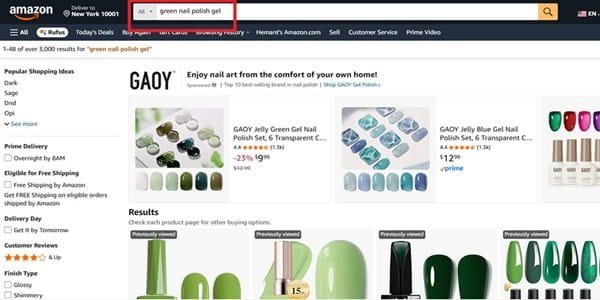
Begin by identifying baseline transactional attributes within your target niche.
- Select a Target Category: Choose a primary root entity (e.g., Nails).
- Mine Transactional Autocomplete Modifiers: Input your seed term along with specific qualifiers into Amazon’s search engine (e.g., Green nails).
- Extract Modifiers: Document the recurring commercial suffixes and prefixes generated by Amazon’s autocomplete:
green nail polish gel
green nails press ons
green nail stickers
These terms signal existing consumer purchase intent and validated commercial demand.
Step 2: Mine the Top Products for Hidden Keyword Data
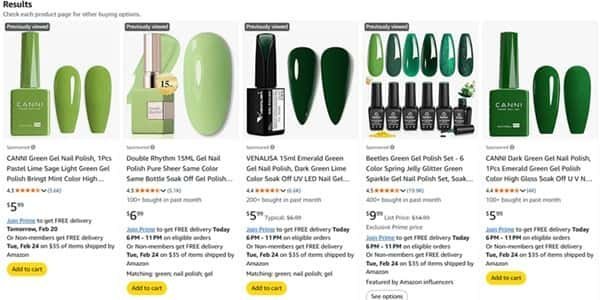
Now here’s what I’m going to do next.
I’m going to click on “green nail polish gel”
Then open the top 2 or 3 products and analyze:
Product titles
Bullet points
What phrases are used repeatedly?
Reviews
If multiple sellers are using similar phrases like:
- Green Gel Polish
- Gel Nail Polish
- Gel Polish Set
- St. Patrick’s Day
It means they have keyword value.
Amazon sellers are paying for keyword research tools.
They’re testing titles.
They’re optimizing listings.
You get to benefit from their research, for free.
And this is how you find keywords that people are willing to pay for on Pinterest.
If Amazon sellers are adding “St. Patrick’s Day” to the end of their green gel polish listings, it means there is an audience interested in seasonal nail polish.
Which brings me to the next step…
Step 3: Validate Pinterest Demand
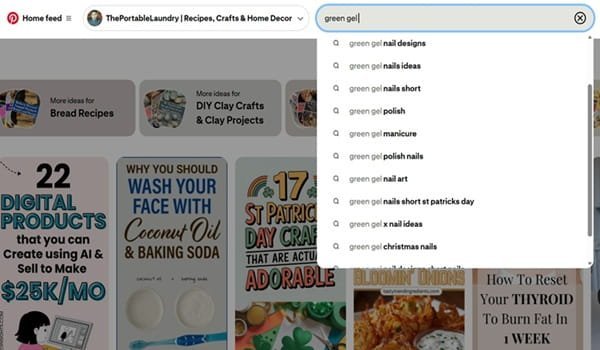
Let’s now go to Pinterest and type in:
“Green gel”
Now see what suggestions come up.
What related searches are there?
How many pins are ranking for this term?
If you see suggestions like:
- green gel polish
- green gel nail design
- green gel nail art
it means there is demand on Pinterest.
Now we’ve established:
- There is buying intent on Amazon
- There is visual demand on Pinterest
This is what it means to find keywords that make money.
Not just any keywords.
The right keywords.
Step 4: Algorithmic Expansion Using Pintrendo
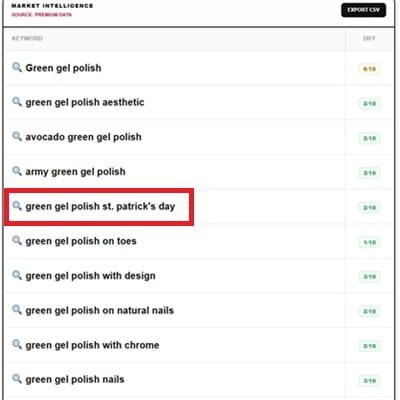
Now, feed your validated commercial seed keywords into Pintrendo (Pinterest Keyword Tool) to uncover untapped, low-competition long-tail query clusters.
- Input your core target phrase into Pintrendo (e.g., green gel polish).
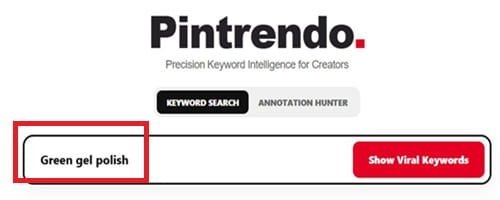
2. Filter and extract long-tail variations, low-competition semantic nodes, and contextual angles:
- green gel polish aesthetic
- avocado green gel polish
- army green gel polish
- green gel polish St. Patrick’s Day
Why Pintrendo Is Essential in This Workflow
Generic search tools often miss platform-specific visual variations and seasonal search surges on Pinterest. Pintrendo identifies how Pinterest users specifically modify commercial search terms with visual and temporal qualifiers, allowing you to capture high-intent traffic before competition peaks.
Step 4: Go Deeper Using Pintrendo
Now take your seed keyword (“green gel polish”) and go to Pintrendo – Free Pinterest Keyword Tool.
Start looking for:
- Related long tail phrases
- Low competition angles
- Under-served topics
In this example, we get to see:
- green gel polish aesthetic
- avocado green gel polish
- army green gel polish
- green gel polish St. Patrick’s Day
The last one I’m highlighting stands out as it has high commercial intent.
Many free keyword tools will miss the seasonal angle, but “Green gel polish St. Patrick’s Day” stands out.
Why am I excited about seasonal keywords?
Seasonal keywords have a certain appeal because they evoke a sense of urgency.
They are tied to an event (St. Patrick’s Day).
And they are a goldmine for Pinterest marketing.
Rather than writing a generic blog post about “green nails,” you could write something specific like:
“Green Gel Polish for St. Patrick’s Day That Looks Expensive”
That way you’re appealing to both:
Pinterest’s love for long tail keywords
And
Amazon’s love for commercial intent
Step 5: Turn It Into a Strategic Blog Post
Now create a blog post around that long tail keyword.
Here’s how I’d structure such a post:
1. Intro (Problem + Trend Angle)
Talk about seasonal nails and St. Patrick’s Day style. Appeal to the reader’s emotions.
2. 20 OR 30 Image Ideas
Talk about variations of green gel polish designs:
Minimal green gel
Plus glitter accents
Adding gold foil
Shamrock accents
French tips but in green
Pinterest loves posts with lots of images inside the blog post itself.
3. Style Variations
- Short nails
- Almond shape
- Square tips
- Acrylic vs gel
4. Seasonal Angles
Talk about party look vs office look
Bold vs subtle variations
5. FAQs
Is green gel polish trending?
How long does gel polish last?
What shade of green is best for St. Patrick’s Day?
Keyword Placement Rule (Very Important)
Pinterest SEO works best when you place your keyword in:
Your blog post title
Your URL
Your Pinterest pin description
That means consistency. Pinterest is all about patterns.
Keyword Placement Protocol
For optimal indexing on both Pinterest and search engine result pages (SERPs), apply your primary keyword consistently across these key places:
- Article H1 Title & URL Slug
- On-Page Heading Tags (H2/H3)
- Image Alt Text and File Metadata
- Pinterest Pin Titles, Descriptions, and Text Overlays.
Securing Your Content with The Pintrendo Approach
Finding keywords with commercial intent is only the first step in the process. If you want your blog posts and pins to remain ranked and stable despite algorithm changes, then you have to use The Pintrendo method.
The Pintrendo Method is an approach to structuring your content in order to create a map between visual long-tail searches and multi-level topic nodes. Rather than making individual pins, you are securing your Pinterest content from the future.
See our complete article on The Pintrendo Method.
Step 6: How I Create 30 to 50 Pins Fast in Canva
Now let’s talk about how to create 30 to 50 Pinterest pins in Canva.
Many ask, “How does” Or “How do you create bulk pins quickly?” create so many Pinterest pins so fast?”
Here’s what I do inside Canva.
Step A: Create a Master Template
I open Canva
I select Pinterest pin dimensions
And then I create a master Pinterest pin template. Here’s what mine looks like:
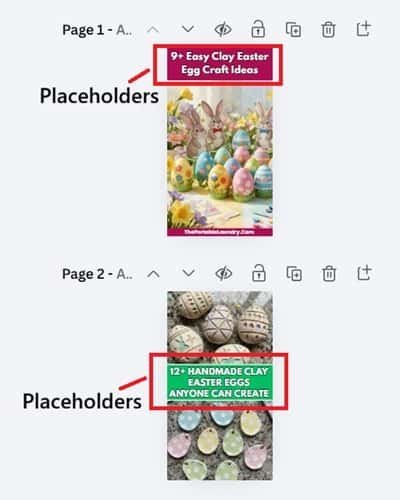
Big headline space
A frame around the image
2 to 3 brand colors
Light background
Small website URL at the bottom
I don’t design 50 Pinterest pins. I design 5 strong Pinterest pin templates. These are the variations I use:
Text on top / image at the bottom
Split layout – text in the middle, images on top and bottom
Full image with text overlay
Minimal white layout
Bold background layout
I’m focusing on structure first.
Step B: Duplicate and Plug In
And now I simply duplicate this Pinterest pin and start plugging in:
Different headlines
Different images
And sometimes different background colors.
This is what makes creating Pinterest pins so fast.
Everything is structured already. I just fill in the blanks.
That’s how to create 30 to 50 Pinterest pins in no time at all.
The secret is not speed. The secret is building this system ahead of time.
Step 7: Connect the Entire System
Let’s now talk about connecting this entire system together.
You have:
Pinterest research
Amazon research
Pintrendo research
A long tail blog post
30 to 50 Pinterest pins in Canva
And now we’re going to tie it all together.
The entire system works like this:
Pinterest demand + Amazon demand + Pintrendo long tail research = blog post with monetization potential.
Monetization options could be:
Affiliate links (nail polish)
Display ads
Digital products (nail kits, styling guides)
Nail polish kits
Seasonal guides (St. Patrick’s Day styling guide)
Because now we’re appealing to buyers on both Pinterest and Amazon.
The Real Strategy Behind This Amazon Keyword Research
Amazon keywords tell you what people are willing to buy.
Pinterest keywords tell you what people are willing to dream about.
You’re a matchmaker between the two.
This is where your monetization potential lies.
Traffic coming in from Pinterest searching for seasonal green gel polish will find your blog post and convert.
Bonus Resource
I’ve compiled my top Pinterest keywords in a list for you.
If you want to skip some of the legwork, this is a great resource for you. This is a list of popular Pinterest keywords that have traffic and monetization potential.
It will help you:
Find high demand niches.
Find good seed keywords.
Discover under-served long tail subtopics.
And then you simply apply the entire Amazon + Pinterest methodology we went over in this article.
Final Thoughts
If your Pinterest traffic is not converting into sales, it’s usually because of keyword selection.
For a very long time, I chased Pinterest trends.
I chased pretty Pinterest boards.
I chased viral Pinterest content. The traffic was there. The engagement was there. But the sales were not.
It wasn’t until I did a complete mindset shift and started focusing on keywords that people actually buy on Pinterest that everything changed for me.
That’s why starting with Amazon is so crucial. It filters out the noise and gives you a list of keywords that people are actually purchasing.